 Jonathan Blake

Every “best CRM” list ends up in the same place: a big name at the top, a free option somewhere in the middle, and an affiliate link under each. This one has affiliate links too, so here is how I will try to earn your trust. I rank by business type, I tell you who should skip each tool, and I only quote prices I could see on the vendor’s own page.
I have sold face to face since 2015, ran a tree service for six years, and now co-own The Lead Venture, an agency that runs on HighLevel every day. I make money if you sign up for HighLevel through my link. I also tell people not to buy it when it is the wrong tool, and you will see that below.
Short answer: for a phone-driven local business, my pick is GoHighLevel. For a free start, try HubSpot’s free CRM or Zoho’s free plan. For a salesperson who just tracks deals, Pipedrive. If you are a roofer, realtor or lawyer, look at an industry CRM first.
How I ranked these
I used five questions, in this order.
- What happens in the first five minutes after a lead comes in? The best CRM is the one your team opens before they open their email. Speed to reply decides more deals than any report.
- What does it cost as you add people? Per-seat pricing is cheap with one person and not with eight.
- How hard is the first week? A tool you do not set up does not help.
- What is locked behind the next tier? Free and cheap plans are fine until the feature you need sits one plan up.
- Can you get your data out? You should always be able to export contacts and deals as a CSV.
Prices below come from each vendor’s own pricing page in November 2026 where I could see them. Where I could not, I say “check current pricing.”
The best CRMs for small business, ranked by fit
- 1 Read the full breakdownBest for phone-driven local business
GoHighLevel
- CRM, texting, calls, booking and automation in one login
- Flat $97/month Starter, unlimited users and contacts
- Not for in-house B2B teams that want deep reporting
- 2 Read the full breakdownBest free start with 1 or 2 users
HubSpot Free CRM
- Free for up to 2 users on HubSpot's page
- Clean, easy to learn
- Paid tiers are per seat and climb
- 3 Read the full breakdownBest budget CRM
Zoho CRM
- Free plan for up to 3 users
- Paid from $14 per user per month, billed annually
- Plainer feel, texting not the center
- 4 Read the full breakdownBest for a pure sales pipeline
Pipedrive
- Visual deal board, quick to learn
- From $14 per seat per month, billed annually
- Needs other tools for texting and funnels
- 5 Read the full breakdownBest if your trade has its own
Industry CRMs
- Built around your jobs, listings or cases
- Examples: JobNimbus, Follow Up Boss, Clio
- Follow-up tools may be thinner
- 6 Read the full breakdownBest for solo email automation
Keap
- Contacts, email automation and invoicing
- Built for small business
- Check current pricing
- 7 Read the full breakdownBest to grow into, not start on
Salesforce
- Very capable, highly configurable
- Usually needs setup and an admin
- Check current pricing
Comparison table
| CRM | Best for | Starting price | Free plan | Texting and calls | Biggest catch |
|---|---|---|---|---|---|
| GoHighLevel | Phone-driven local business | $97/month flat, plus usage | No (trial only) | Built in | Learning curve, thinner reporting |
| HubSpot | In-house teams, free start | Free for up to 2 users | Yes | Check current features | Seats and tiers add up |
| Zoho CRM | Budget teams | Free for up to 3 users; paid from $14 per user | Yes | Not the center | Per-user pricing |
| Pipedrive | Deal-focused sales | From $14 per seat, billed annually | No | Needs other tools | Per seat |
| Industry CRMs | Trades, real estate, law | Check current pricing | Varies | Varies | Follow-up tools can be thin |
| Keap | Solo email automation | Check current pricing | Check current plans | Not the focus | No agency layer |
| Salesforce | Larger teams | Check current pricing | No | Add-ons | Needs setup and upkeep |
1. GoHighLevel
Best for: local businesses (trades, home services, clinics, gyms, agencies) that get leads by phone, text and web form and need to answer fast.
Why it ranks first for this audience: the CRM, texting, calls, booking calendar, forms and automations share one database. A missed call can trigger a text within a minute, create a deal and book an appointment without anyone touching it. A CRM that does not text the lead back in a minute is just an expensive address book. HighLevel’s plans have unlimited users and contacts, so adding a person does not change the bill.
As of late 2026, per HighLevel’s pricing page, Starter is $97 a month (3 sub-accounts), Unlimited is $297 and the $497 plan adds SaaS mode. Usage for texts, calls, email and AI is billed on top. See my pricing breakdown and CRM guide.
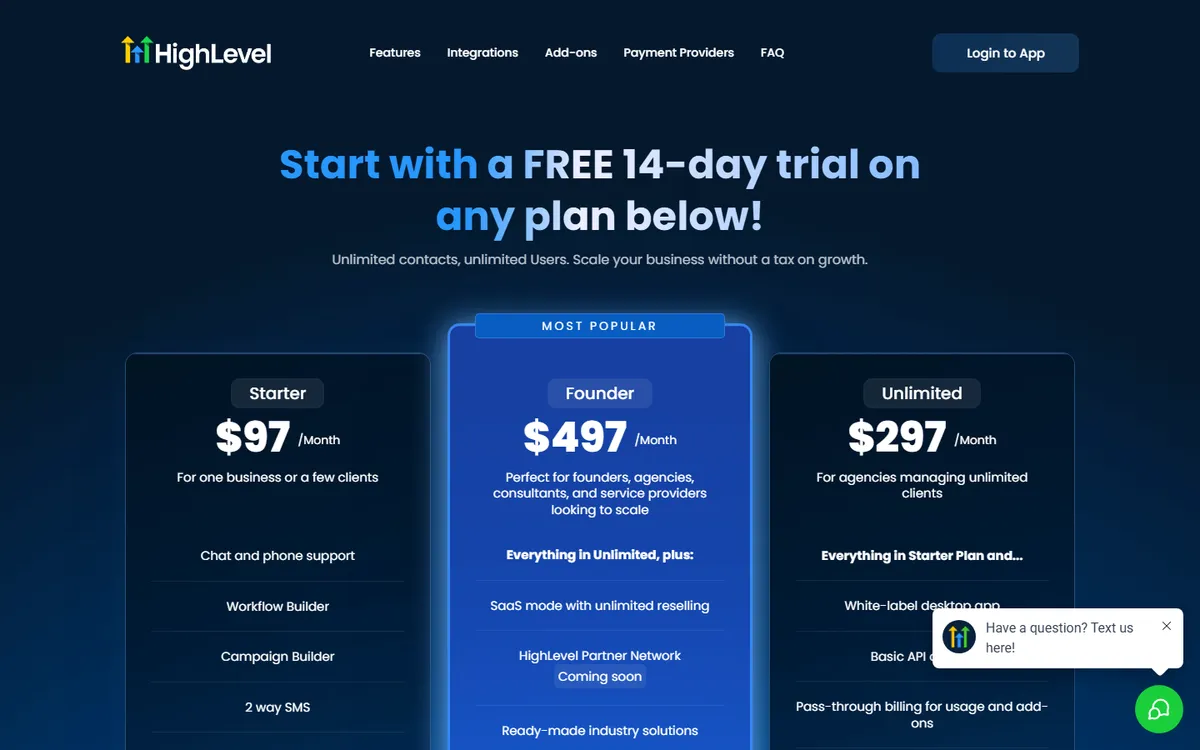 HighLevel’s pricing page, November 2026.
GoHighLevel for small businesses
Pros
- Flat plans with unlimited users and contacts
- Texting, calls, email and booking built into the same record
- Workflows can act on any CRM event
- Snapshots copy a working setup to a new account
Cons
- Dense menus and a week or two of setup
- Reporting is shallower than HubSpot or Salesforce
- Texts, calls, email and AI are billed on top
- No free plan, only a trial
Who should skip it: an in-house B2B sales team that wants the deepest reporting, or an owner who will not spend a week or two building the first pipeline and workflow.
Start your free HighLevel trial 30-day trial · cancel anytime · keep the bonuses I may earn a commission if you sign up through my link, at no extra cost to you. Details2. HubSpot Free CRM
Best for: owners and very small teams who want free, simple and good-looking.
Why it makes the list: HubSpot’s pricing page lists a free plan for up to 2 users with core CRM tools and no credit card. If you only need contacts, deals and basic tracking, that can carry you a long way.
What to watch: paid plans are per seat and rise by tier, and some higher tiers add onboarding fees. As a reference point, Sales Hub Professional listed at $90 per seat per month on annual billing plus a $1,500 onboarding fee as of late 2026, per HubSpot’s pricing page. Free is a fine place to start and a bad place to get stuck. Decide before you build 20 workflows what you will do at the paywall.
HubSpot Free CRM
Pros
- Free for up to 2 users
- Clean and easy to learn
- Large ecosystem and lots of tutorials
Cons
- Paid tiers are per seat and climb
- Texting and calling are not the center
- Some features sit behind higher tiers
Who should skip it: teams of three or more that need to text customers, or anyone who wants flat pricing. See HubSpot alternatives and GoHighLevel vs HubSpot.
3. Zoho CRM
Best for: budget-minded teams of up to three who want a free start and room to customize.
Why it makes the list: Zoho’s page lists a forever-free plan for up to 3 users. The paid tiers on the page I checked were $14 (Standard), $23 (Professional) and $40 (Enterprise) per user per month on annual billing. It is a real CRM with fields, views and rules, and it sits inside a large family of Zoho apps.
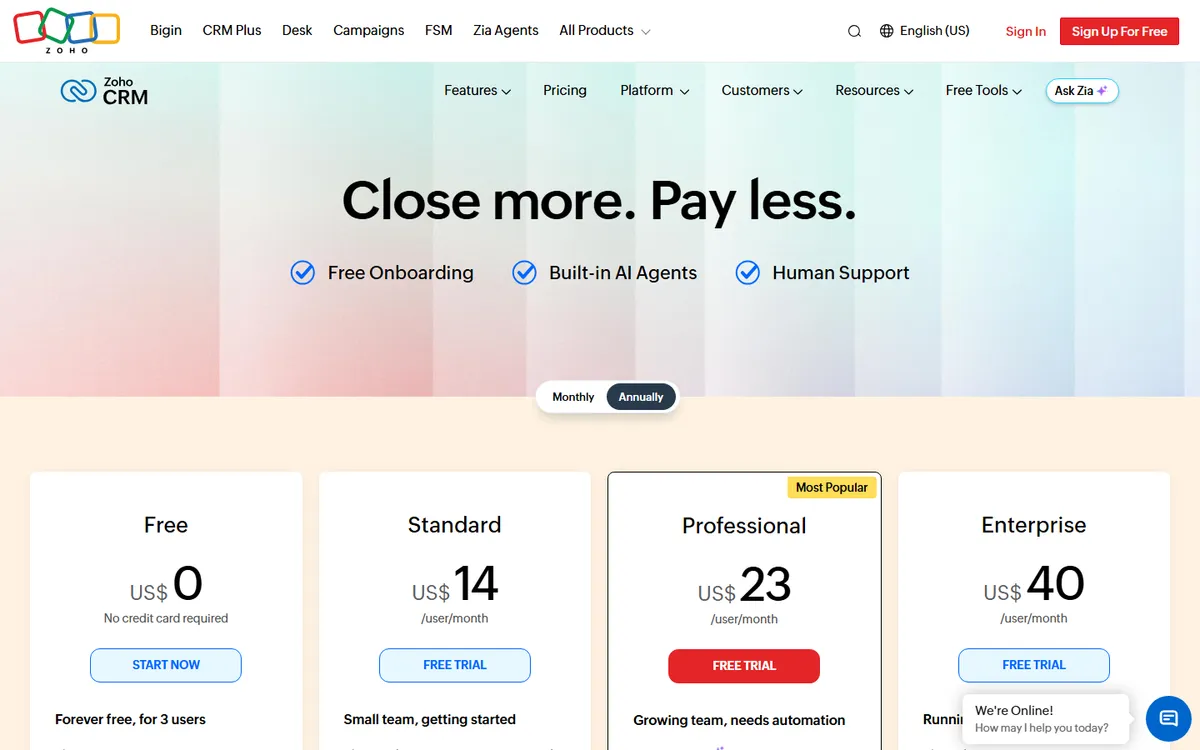 Zoho CRM’s pricing page, November 2026.
Zoho CRM
Pros
- Forever-free plan for up to 3 users
- Low per-user prices on annual billing
- Customizable fields and views
Cons
- Per-user pricing brings the seat problem back as you grow
- Texting and phone are not the center
- A plainer feel than some rivals
Who should skip it: owners whose leads mostly come by text and phone. See Zoho CRM alternatives.
4. Pipedrive
Best for: a salesperson or a small sales team that thinks in deals and stages.
Why it makes the list: the visual pipeline is the whole product. It is quick to learn and it does not try to be a marketing platform. The page I checked listed Lite at $14, Growth at $39, Premium at $59 and Ultimate at $79 per seat per month billed annually.
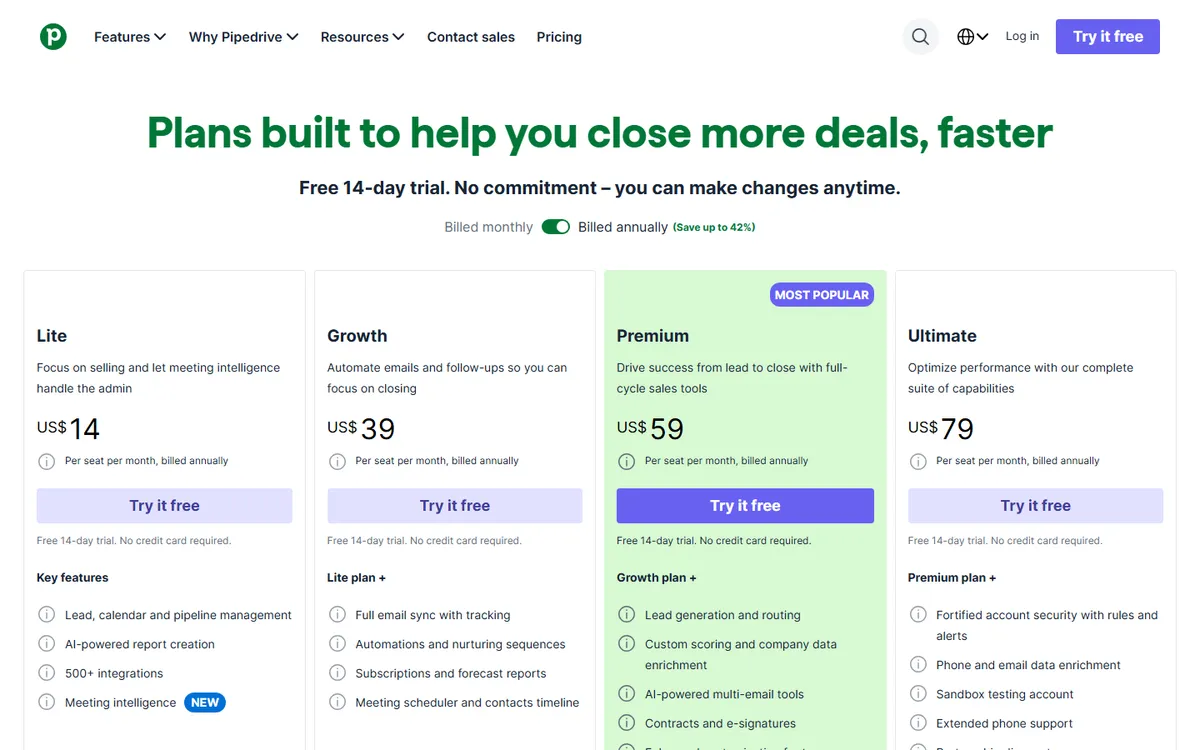 Pipedrive’s pricing page, November 2026.
What to watch: it is per seat, and you will need other tools for texting, funnels and larger automations. If your work is calls and texts with local customers, you will outgrow it quickly. See Pipedrive alternatives.
Who should skip it: owners who need messaging and booking inside the same system.
5. Industry CRMs for trades, real estate and law
Best for: businesses where the job, listing or case is the main record.
If your industry has its own CRM, try it before a general one. It already has the right stages, field names and paperwork. A few examples I have written about:
- Roofing and contractors: JobNimbus and similar. See CRM for roofers.
- Plumbing and HVAC: CRM for plumbers and HVAC CRM.
- Real estate: Follow Up Boss and others. See real estate CRM.
- Law firms: Clio Grow and others. See CRM for law firms.
- Also covered: landscaping, cleaning, auto repair, mortgage and insurance.
I keep every niche guide on one page: CRM by industry.
What to watch: industry tools are strong on your workflow and often weaker on follow-up automation, texting and reactivation. Some owners end up paying for a second tool. If you run field-service software like Jobber, Housecall Pro or ServiceTitan and want to compare, read my Jobber alternatives, Housecall Pro alternatives and ServiceTitan alternatives.
6. Keap
Best for: a solo owner or very small team that wants contacts, email automation and invoicing together.
Why it makes the list: it is built for small businesses and the automation is aimed at follow-up after a lead comes in.
What to watch: no agency layer, and calling and texting are not the focus. Check current pricing on Keap’s site. I would rather give you no number than a stale one. See also my ActiveCampaign alternatives post if you are comparing email-driven CRMs.
7. Salesforce
Best for: larger teams with an admin, complex reporting and a long list of integrations.
Why it is last: it is extremely capable, and for most small businesses that capability is overhead. If you are not sure you need it, you do not. Check current pricing on Salesforce’s site, and plan for setup time. See Salesforce alternatives if you are already on it and wondering about the bill.
How to pick this week
Use this decision rule.
- Most leads call or text, and you want one flat bill: start a GoHighLevel trial.
- You want free and simple, with one or two users: try HubSpot’s free CRM.
- You want free with three users or a low per-seat price: try Zoho.
- You track deals with a salesperson: try Pipedrive.
- Your trade has its own CRM: try that first.
Then run it with 20 real contacts for a week. Ask one question at the end: did a lead get answered faster than before? If yes, you have the right tool. If not, try the next one on the list. Moving contacts between tools is easy, and rebuilding habits is the hard part.
Not sure what category you are in? Read my CRM examples post for what each type looks like day to day, my CRM database guide for how to set up your data, and my cloud-based CRM guide for what to check before you buy. My software alternatives page lists every swap I have written up.
If you pick HighLevel, the standard trial is 14 days and my link gives a 30-day extended free trial.
Quick wins
Want clients this month? Start here
Set up your own house first. One clear offer for one niche, a simple site, a booking link and your own HighLevel account running the same automations you'll sell. Prospects trust what they can try.
Start with people who already know you
Past employers, old customers, friends who own businesses. Tell them exactly what you set up for small businesses picking a CRM and ask for 20 minutes.
Do daily outreach
Calls, emails and DMs to a tight list in one niche. Volume and follow-up beat clever copy.
Demo, don't describe
Build a quick AI agent or missed-call text-back demo in your own HighLevel account and let them try it on the call.
Post what you build
Short screen recordings of real automations. One a day on the platform your buyers use.
Partner with people who own your buyers
Web designers, bookkeepers and software resellers already have the relationship. Trade introductions.
Answer every lead in under a minute
Practice what you sell. Set up your own speed-to-lead automation first.
Work a local area in person
- Pick one area and walk into ten businesses in a row. Ask for the owner, keep it to two minutes and leave a card.
- Bring a one-page printout that shows the problem you fix (missed calls, slow follow-up, no reviews) with their name on it.
- Go back a week later. Most first visits are about being remembered, not closing.
Ask for introductions, not referrals
"Know anyone who could use this?" gets a polite "I'll think about it." Asking to be introduced to a specific kind of person gets names. Set it up when they sign:
"If this works the way I think it will, would you be against introducing me to one or two other small businesses picking a CRM you know? I'll give them a free CRM fit checklist."
Then follow up once they're seeing results. With a client you get along with, a little humor works:
"So are you keeping me a secret on purpose, or do you just not like your friends?"
Only joke like that with clients you know well. With everyone else, keep it simple and thank them either way.