 Jonathan Blake

I get this question from new agency owners all the time: “Should I use HubSpot or HighLevel?” Usually they’ve heard HubSpot is the “real” CRM and HighLevel is the agency tool, and they’re worried about picking the wrong one.
Here’s the short version. HubSpot is built for a company to run its own sales team. HighLevel is built for an agency to run everyone else’s. Once you see that, most of the decision makes itself.
I run my agency on HighLevel, so I’ll be upfront about my bias. I’ve also kept a whole section on when HubSpot is the better pick, because for some readers it is. For opinions that are not mine, I also went through what Reddit says about GoHighLevel.
Quick answer and comparison table
GoHighLevel
- Built for: Agencies managing many client businesses
- Price model: Flat monthly, unlimited users and contacts
- Entry price: $97/month (3 client accounts)
HubSpot
- Built for: Companies running their own sales and marketing
- Price model: Per seat, with contact tiers and credits
- Entry price: Free (2 users)
| Item | GoHighLevel | HubSpot |
|---|---|---|
| Built for | Agencies managing many client businesses | Companies running their own sales and marketing |
| Price model | Flat monthly, unlimited users and contacts | Per seat, with contact tiers and credits |
| Entry price (late 2026) | $97/month (3 client accounts) | Free (2 users), Starter $7/seat/month annual or $20 monthly |
| Mid tier | $297/month, unlimited client accounts | Sales Hub Pro $90/seat/month annual, Marketing Hub Pro $800/month |
| Onboarding fees | None | $1,500 (Sales Pro), $3,000 (Marketing Pro) |
| Two-way SMS | Built in, pay per message | Not a core tier feature; often an add-on or integration |
| Calling | Built in, pay per minute | Minutes included: 500 (Starter), 3,000 (Pro), 12,000 (Enterprise) |
| Missed-call text back | Built in | Not built in that I’ve found |
| White label and reselling | Yes | No |
| Reusable client setups | Snapshots | No equivalent |
| AI | Conversation AI, Voice AI, AI Employee plans | Breeze AI, agents billed with HubSpot Credits |
Real cost: HubSpot’s seat creep vs HighLevel’s flat fee
This is where the two are most different.
HighLevel charges your agency one flat fee. As of late 2026 that’s $97, $297 or $497 a month. Every plan includes unlimited users and contacts. Usage (calls, texts, emails, AI) is billed on top, and you can pass it to clients.
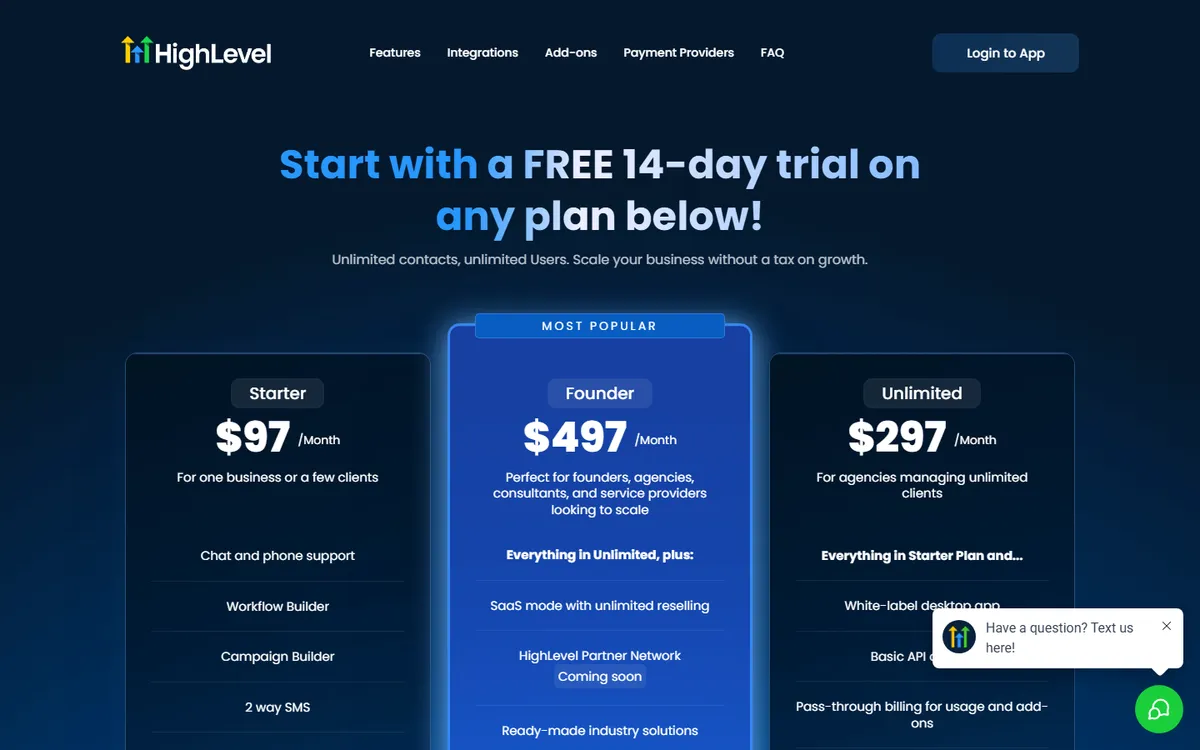 HighLevel’s pricing page, November 2026.
HubSpot charges per seat. Starter is $7 per seat per month on annual billing or $20 monthly. Sales Hub Professional is $90 per seat per month on annual billing ($100 monthly) plus a one-time $1,500 onboarding fee. Marketing Hub Professional starts at $800 a month with three core seats and 2,000 marketing contacts, plus a required $3,000 onboarding fee. The full Professional Customer Platform bundle is $1,300 a month.
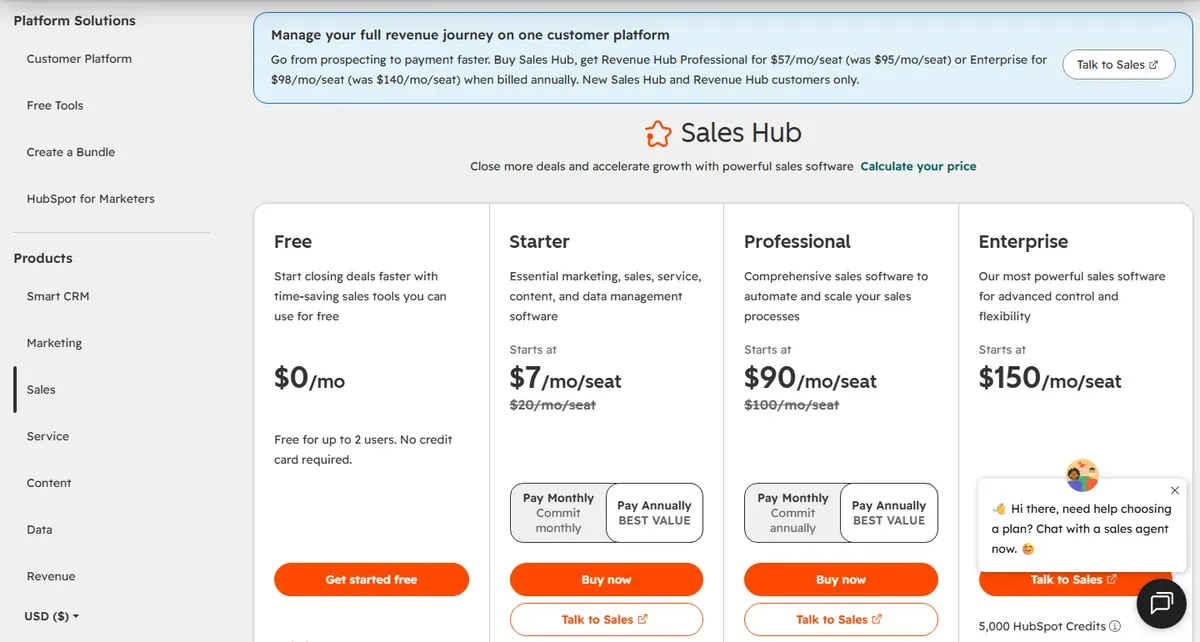 HubSpot’s Sales Hub pricing page, November 2026.
The bigger difference is the account structure. HubSpot is one company’s portal. An agency serving 20 clients doesn’t run them all in one HubSpot portal. Each client needs its own, with its own subscription.
Here’s a rough look at the software cost for an agency setting up sales automation for each client:
| Clients | HighLevel | HubSpot (Sales Hub Pro, 1 seat per client, annual) |
|---|---|---|
| 1 | $97/month (Starter) | $90/month + $1,500 onboarding |
| 5 | $297/month (Unlimited) | $450/month + up to $7,500 in onboarding fees |
| 20 | $297 or $497/month | $1,800/month + up to $30,000 in onboarding fees |
That table assumes one seat per client and Sales Hub only. Add marketing features or more users and the HubSpot side climbs fast. HighLevel’s usage fees are extra too, but a client can usually cover them, and you can pass them through.
Seat pricing punishes you for growing. Flat pricing rewards you for it. I ran the same comparison against Pipedrive.
CRM and pipelines
Both are solid CRMs. HubSpot’s is more polished. Its records, timelines, reporting and data tools are excellent, and it’s easier for a non-technical sales team to pick up.
HighLevel’s CRM does what a local business needs: contacts, tags, custom fields, multiple pipelines and an opportunity board you can drag deals across. It’s less refined, but it lives in the same place as the phone system, texting, calendars and reviews. For a home service business, that matters more than reporting depth.
Edge: HubSpot for CRM polish and reporting. HighLevel for having everything in one account.
Automation and workflows
HubSpot workflows are reliable and well designed, but full workflows are a Professional feature. HubSpot’s sales pricing page lists up to 50 workflows with restricted triggers on Starter and up to 300 fully customizable workflows on Professional.
HighLevel includes its full workflow builder on every plan. The triggers are built around what local businesses need: missed calls, form fills, appointment booked, pipeline stage changed, review received. And because workflows live in snapshots, I build one great follow-up sequence once and every new client gets it.
Edge: HighLevel for agencies. HubSpot if you’re one company with a technical ops person.
SMS, calling and missed-call text back
For local service businesses, this is the deciding category.
| Feature | GoHighLevel | HubSpot |
|---|---|---|
| Two-way SMS inbox | Built in | Not a core feature of each tier |
| Local phone numbers | $1.15/month | Included numbers for calling |
| Call recording and tracking | Built in | Built in |
| Missed-call text back | Built in, takes minutes | Needs an integration |
| Texting from workflows | Built in | Depends on add-ons |
| Cost | $0.00747/SMS segment, $0.0166/min outbound | Calling minutes bundled per tier |
At my agency, missed-call text back, review requests and reactivation texts to old customers do a lot of the heavy lifting for tree service, lawn and roofing clients. Those all run on texting. In HighLevel they’re native. In HubSpot you’d be stitching together other tools to do the same thing.
White label and reselling
This is the clearest difference. HighLevel lets you put your own brand on the platform: your domain, your logo, your login page. On the $497 plan you can sell it as your own software with SaaS mode. See GoHighLevel white label and how SaaS mode works.
HubSpot doesn’t offer a white-label CRM. Agencies work with HubSpot through its Solutions Partner Program, where you sell and implement HubSpot, and the client uses HubSpot-branded software and pays HubSpot.
Neither approach is wrong, but if you want to own the client relationship and the software subscription, only HighLevel lets you do it.
Start your free HighLevel trial 30-day trial · cancel anytime · keep the bonuses I may earn a commission if you sign up through my link, at no extra cost to you. DetailsAI features
HubSpot’s AI is called Breeze. HubSpot’s sales pricing page lists included HubSpot Credits per tier (500 on Starter, 3,000 on Professional, 5,000 on Enterprise) that power AI agents like the Prospecting Agent and Customer Agent, with extra credits at $0.010 each. It’s well built, and it’s aimed at B2B sales and support teams.
HighLevel’s AI is aimed at answering leads. Conversation AI answers texts and chats and books appointments. Voice AI answers phone calls. As of late 2026 the AI Employee plans are $50 or $97 per month per sub-account, or you can pay per use (Voice AI speech-to-speech models run $0.10 to $0.20 per minute, plus phone charges).
At my agency we sell AI voice and Conversation AI as an add-on at $197 a month plus usage. A small business owner understands “every call and text gets answered and booked” immediately. That’s an easier sale than a sales-team AI copilot.
Edge: HubSpot for B2B sales teams. HighLevel for local businesses that need leads answered.
Ease of use and learning curve
HubSpot is easier to learn. The interface is clean, the menus are predictable, and HubSpot Academy has free training on almost everything. A new sales rep can be useful in HubSpot on day one.
HighLevel has a steeper curve. It does more things in one place, and the settings can feel scattered when you’re new. The upside is that once you’ve learned it, you’ve learned the tool for every client, and snapshots mean you rarely build the same thing twice.
My honest take: if you’re handing the CRM to a client’s team and walking away, HubSpot is easier for them. If you’re the one building and managing the system for them, HighLevel’s learning curve is a one-time cost you pay once and reuse across every account.
Support and ecosystem
HubSpot has a huge marketplace of integrations, a large partner network and polished documentation. If a tool exists, it probably connects to HubSpot.
HighLevel’s ecosystem is smaller but very agency-focused: snapshot sellers, workflow templates, a busy community on Facebook and YouTube, and an API for building integrations. Support quality on HighLevel varies, and I’ve had both fast and slow experiences. The community often answers faster than a ticket.
GoHighLevel for an agency
Pros
- Flat pricing with unlimited users and contacts
- Texting and missed-call text back built in
- Snapshots, white label and SaaS mode
Cons
- Steeper learning curve than HubSpot
- Less polished CRM and reporting
- Support quality varies
Moving a client from HubSpot to HighLevel
If you’re switching a client over, here’s the order I’d use:
- Export contacts, companies and deals from HubSpot as CSV files.
- Map the fields before importing. Create matching custom fields in HighLevel first.
- Rebuild the pipeline stages so deals land in the right place on import.
- Rebuild the key workflows. Automations don’t transfer, so this is the slow part. Start with lead follow-up and missed-call text back.
- Set up the phone number and texting registration (A2P 10DLC) early, because approval can take time.
- Run both systems for a week or two before you turn HubSpot off.
Most of the work is in step 4. If the client has years of HubSpot workflows, budget real time for it.
When HubSpot is the better choice
I’d point you to HubSpot if:
- You’re one company, not an agency. A B2B company with its own sales and marketing team will love HubSpot.
- You need serious reporting. Attribution, custom reports and dashboards are stronger in HubSpot.
- You sell to enterprise buyers. HubSpot’s brand, security reviews and integrations carry weight with bigger clients.
- Your clients already run HubSpot. If they’re invested in it, becoming a HubSpot partner may fit better than moving them.
- Your team isn’t technical. HubSpot is easier to learn and better documented.
HighLevel isn’t trying to win those buyers. It’s trying to be the platform an agency runs dozens of small businesses on.
My pick and why
For an agency serving local businesses, I pick HighLevel, and it’s not close. Flat pricing, texting, missed-call text back, snapshots, white label and SaaS mode are exactly what that kind of agency needs. HubSpot is a better CRM in a vacuum. It’s just not built to be resold. If you’re choosing HighLevel as the base for a new agency rather than switching an existing one, I lay out the rest of that plan in how to start a marketing agency.
If you’re still deciding, read my full GoHighLevel review and the GoHighLevel pricing breakdown. If you’re moving clients off HubSpot and want help rebuilding their workflows, that’s a common consulting project.
Quick wins
Want clients this month? Start here
Set up your own house first. One clear offer for one niche, a simple site, a booking link and your own HighLevel account running the same automations you'll sell. Prospects trust what they can try.
Start with people who already know you
Past employers, old customers, friends who own businesses. Tell them exactly what you set up for local service businesses and ask for 20 minutes.
Do daily outreach
Calls, emails and DMs to a tight list in one niche. Volume and follow-up beat clever copy.
Demo, don't describe
Build a quick AI agent or missed-call text-back demo in your own HighLevel account and let them try it on the call.
Post what you build
Short screen recordings of real automations. One a day on the platform your buyers use.
Partner with people who own your buyers
Web designers, bookkeepers and software resellers already have the relationship. Trade introductions.
Answer every lead in under a minute
Practice what you sell. Set up your own speed-to-lead automation first.
Work a local area in person
- Pick one area and walk into ten businesses in a row. Ask for the owner, keep it to two minutes and leave a card.
- Bring a one-page printout that shows the problem you fix (missed calls, slow follow-up, no reviews) with their name on it.
- Go back a week later. Most first visits are about being remembered, not closing.
Ask for introductions, not referrals
"Know anyone who could use this?" gets a polite "I'll think about it." Asking to be introduced to a specific kind of person gets names. Set it up when they sign:
"If this works the way I think it will, would you be against introducing me to one or two other local service businesses you know? I'll give them a free follow-up audit."
Then follow up once they're seeing results. With a client you get along with, a little humor works:
"So are you keeping me a secret on purpose, or do you just not like your friends?"
Only joke like that with clients you know well. With everyone else, keep it simple and thank them either way.
Try HighLevel side by side
The best test is to rebuild one real client process in HighLevel during the trial. Start through my link and you get a 30-day extended free trial instead of HighLevel’s standard 14 days: one pipeline, one form, one missed-call text back workflow and one review request. If it handles your client’s day better than HubSpot does, you’ll know. If you want guidance on landing the clients to put in it, look at my coaching.
Start your free HighLevel trial 30-day trial · cancel anytime · keep the bonuses I may earn a commission if you sign up through my link, at no extra cost to you. Details