 Jonathan Blake

Pipedrive has a good reputation, and it earned it. It is clean, quick to learn and easy for a sales rep to live in. So why do people search for GoHighLevel vs Pipedrive? Usually because they have outgrown a pipeline and want the follow-up around it.
Short answer: pick Pipedrive if you want the simplest possible deal tracker for a small sales team. Pick GoHighLevel if you need follow-up, texting, booking and automation in the same place as your pipeline. Pipedrive is a very good answer to the question: where is every deal? HighLevel is an answer to a bigger question: what happens to every lead?
I run my agency on HighLevel and earn a commission if you sign up through my link, so keep that in mind. I will also tell you plainly when Pipedrive is the better fit.
GoHighLevel
- Starts at: $97/month, unlimited users
- Best for: Businesses and agencies that need more than a pipeline
- Free trial: 14 days, or 30 days through my link
Pipedrive
- Starts at: $14/seat/month (Lite, billed annually)
- Best for: Small sales teams tracking deals
- Free trial: 14 days, no card required
GoHighLevel vs Pipedrive at a glance
| Item | GoHighLevel | Pipedrive |
|---|---|---|
| Built for | Businesses and agencies that need sales plus marketing in one place | Sales teams that want a visual pipeline |
| Price model | Flat monthly, unlimited users and contacts | Per seat per month |
| Entry price | $97/month | $14/seat/month, billed annually |
| Pipeline and deals | Built in, with multiple pipelines | The core of the product |
| Two-way texting | Built in, pay per message | Not found on its pricing page |
| Email automation | Full workflow builder on every plan | Starts at the Growth plan |
| Funnels and forms | Built in | Check current features |
| Calendar and booking | Built in | Meeting scheduler on the Growth plan |
| White label and reselling | Yes | No |
| AI | Conversation AI, Voice AI, AI Employee plans | AI-powered report creation listed on Lite |
Pricing compared (real monthly cost)
HighLevel is $97, $297 or $497 a month as of late 2026, with unlimited users and contacts. Starter includes three client accounts, and Unlimited covers unlimited accounts. Usage is billed on top: about $0.00747 per text segment, $1.15 a month for a local number and about $0.0166 a minute for outbound calls. The full breakdown is in my GoHighLevel pricing guide.
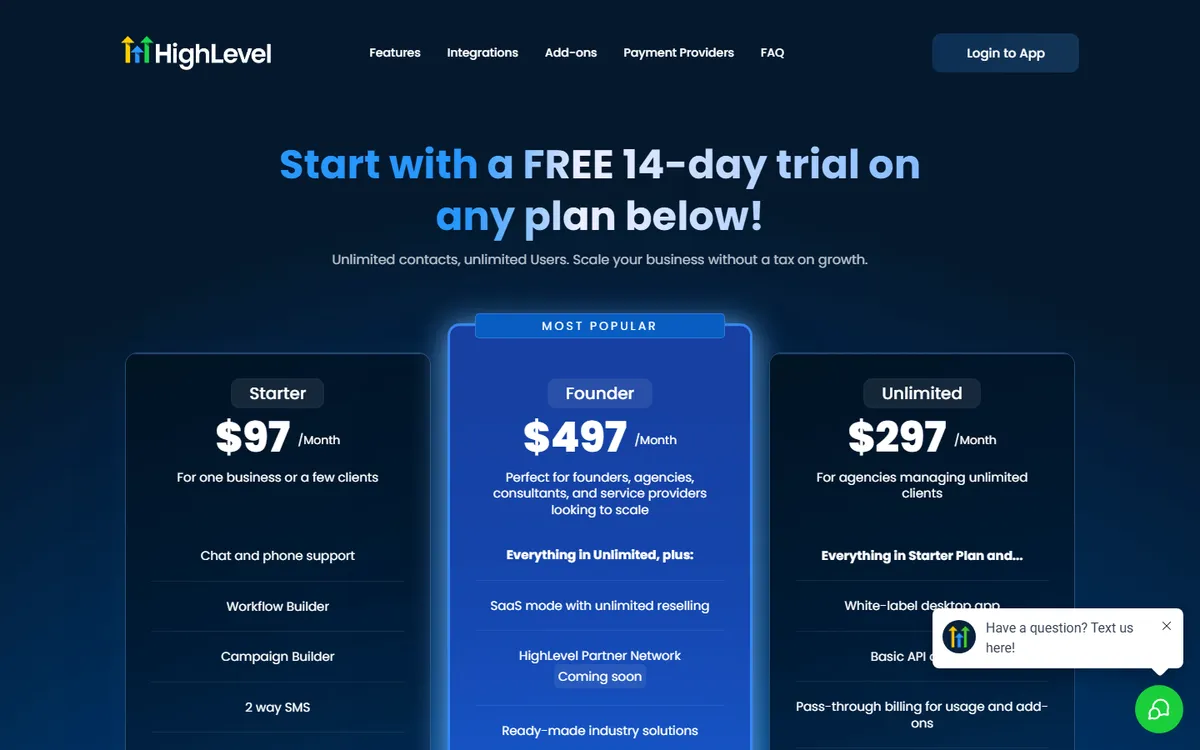 HighLevel’s pricing page, November 2026.
Pipedrive charges per seat. Its pricing page lists Lite at $14, Growth at $39, Premium at $59 and Ultimate at $79 per seat per month, billed annually, with a free 14-day trial and no card required. Growth is where email sync and automations start, and Premium adds contracts and e-signatures.
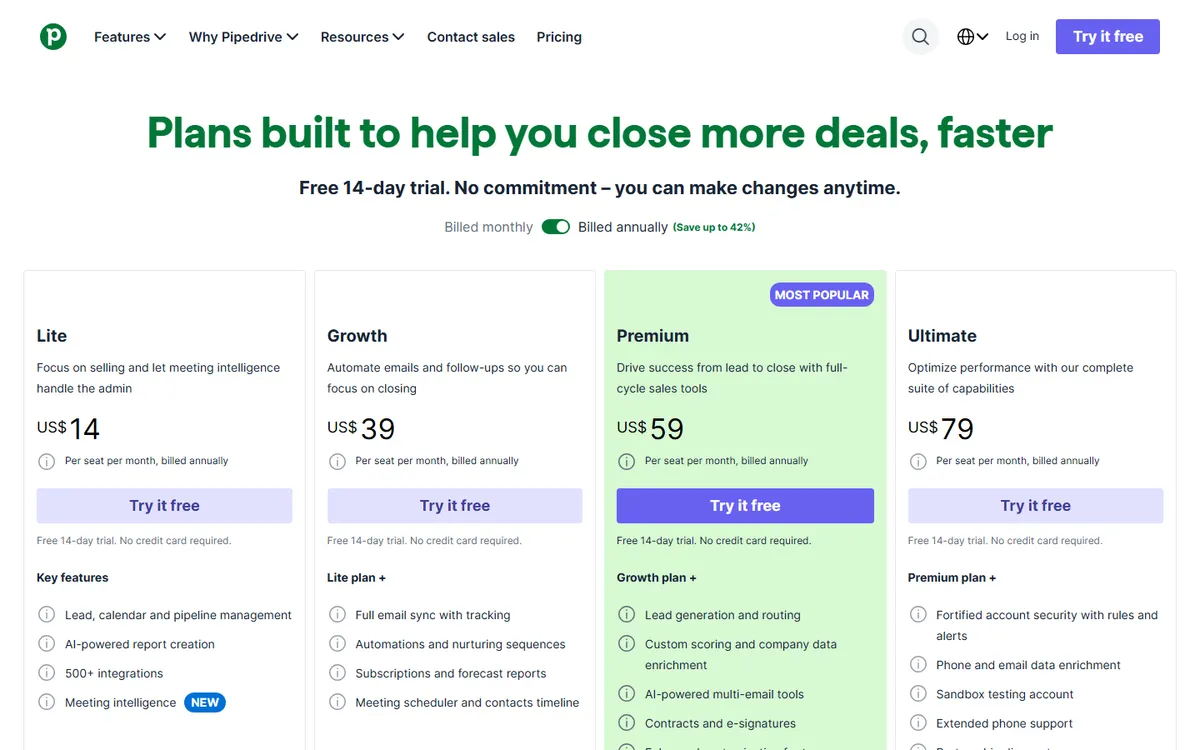 Pipedrive’s pricing page, November 2026.
Here is a rough software-only comparison, using Pipedrive’s annual per-seat prices:
| Team size | HighLevel | Pipedrive Growth | Pipedrive Premium |
|---|---|---|---|
| 2 users | $97/month | $78/month | $118/month |
| 5 users | $97 or $297/month | $195/month | $295/month |
| 10 users | $297/month | $390/month | $590/month |
At two users, Pipedrive Growth is cheaper on paper. By five or ten users, the flat plan starts winning. The more important point is what you are buying. The Pipedrive number covers a pipeline, email sync and automations. The HighLevel number also covers texting, calls, booking, funnels and forms, and a phone system, though usage is billed separately.
Where Pipedrive wins
I have no interest in pretending Pipedrive is a weak product. It is not.
- Simplicity. A rep can learn it in an afternoon. The pipeline view is clean and focused on deals.
- Less to configure. There is less to set up and less to break.
- Polish. The interface is consistent and easy on the eyes.
- Integrations. Its pricing page lists 500+ integrations on every plan.
- Pricing for tiny teams. A solo rep or a pair of reps can run on Lite or Growth at a modest price.
If your whole need is to track deals, forecast and keep reps on task, Pipedrive does the job and does not distract you.
Where GoHighLevel wins
HighLevel wins when the work happens before and after the deal.
- Texting and calls. Two-way texting, missed-call text back and call tracking are built in. See missed-call text back.
- Lead capture. Forms, funnels and booking calendars are in the same account as the pipeline, so a lead lands in the CRM with no connector.
- Automation on every plan. The workflow builder is not locked to a higher tier.
- Flat pricing. A new rep does not raise the bill.
- Reusable setups and white label. Snapshots copy a working setup. On the $497 plan you can resell the platform. See GoHighLevel white label.
A pipeline tells you where a deal stalled. Follow-up is what keeps it from stalling.
GoHighLevel
Pros
- Flat pricing with unlimited users and contacts
- Texting, calls, booking, forms and funnels built in
- Automation on every plan
- Snapshots, white label and SaaS mode
Cons
- Steeper learning curve than Pipedrive
- More setup before it feels finished
- Usage fees for texts, calls and email
- Support quality varies
Pipedrive
Pros
- Simple, clean pipeline
- Fast for a rep to learn
- 500+ integrations listed
- Low entry price for one or two users
Cons
- Per-seat pricing grows with the team
- Texting and booking depend on other tools
- Automations start at higher plans
- No white label
Pipeline and deal tracking
Both give you a drag-and-drop board for deals, and both are fine at it. Pipedrive’s whole identity is the pipeline, so it feels sharper: activities, reminders and forecasts are front and center. HighLevel’s opportunities board does what a local business needs, with multiple pipelines, tags, custom fields and values per deal, but it sits beside a lot of other features and feels less focused.
Edge: Pipedrive for a pure sales-team view. HighLevel when the pipeline needs to connect to texting, booking and forms.
Automation and workflows
Pipedrive’s pricing page lists automations and nurturing sequences starting at the Growth plan. HighLevel includes its full workflow builder on every plan, with triggers built for local businesses: missed calls, form fills, appointments booked, stage changes and reviews. Because a workflow lives in a snapshot, I build a follow-up sequence once and reuse it.
Edge: HighLevel for follow-up that spans text, email and calls.
Texting, calling and AI
HighLevel includes two-way texting and calling, billed per message and per minute. I did not find built-in two-way texting on Pipedrive’s pricing page. On AI, HighLevel’s Conversation AI answers texts and chats and books appointments, and Voice AI answers calls. Pipedrive lists AI-powered report creation among its key features. They are aimed at different jobs: one helps you read the pipeline, the other helps you answer leads.
Ease of use and learning curve
Pipedrive is easier to learn, and it is not close. There is less to configure, so a new rep is productive on day one. HighLevel takes longer, and the settings can feel scattered at first. If your team is handed a tool and told to use it, Pipedrive is the gentler choice. If you are the one building the system, HighLevel’s curve is a cost you pay once.
Support and ecosystem
Pipedrive’s pricing page lists 500+ integrations, so if a tool exists it probably connects. HighLevel’s ecosystem is smaller but agency-focused: snapshot sellers, workflow templates, a busy community on Facebook and YouTube, and an API for building integrations. Support quality on HighLevel varies, and I have had both fast and slow experiences. The community often answers faster than a ticket does.
Three mistakes I see when people pick a CRM
Paying for seats nobody uses. Per-seat tools charge for every login, so a part-time helper or an owner who only looks at reports still adds to the bill. Count who really needs access.
Treating the pipeline as the whole job. A tidy board does not follow up for you. If deals stall because nobody texts or calls, the board only shows you the problem.
Stacking add-ons without adding them up. One texting tool, one scheduler and one form builder later, the cheap plan is not cheap. Total the stack before you compare.
Which should you pick?
- If you are a solo rep or a team of two who just track deals, pick Pipedrive. Do not buy a bigger system than you need.
- If you run a local service business that lives on calls and texts, pick HighLevel. Missed-call text back and review requests are built in.
- If you run an agency serving several clients, pick HighLevel. One flat plan, snapshots and white label fit that work.
- If your team is growing past five people, compare the real math. Seats add up, and the flat plan gets more attractive.
- If you love Pipedrive but need texting, try adding a texting tool first. If you keep adding tools, that is when HighLevel makes sense.
Switching from Pipedrive to GoHighLevel
If you are moving a team over, here is the order I would use:
- Export contacts, organizations and deals from Pipedrive as CSV files.
- Export activities and notes separately. A deals-only file loses the history.
- Create matching custom fields and pipeline stages in HighLevel before you import.
- Rebuild your key automations, starting with new-lead follow-up and the stalled-deal reminder.
- Register your phone number for texting early, because approval takes time.
- Run both for a week or two, then move the team over and turn Pipedrive off.
For other options, read Pipedrive alternatives and my software alternatives hub.
My pick and why
If you need more than a pipeline, I pick HighLevel. Texting, booking, forms, automation and flat pricing cover the part of the sale that happens outside the deal board. If all you want is a clean pipeline and a rep-friendly screen, Pipedrive is simpler and I would not push you off it.
Read my full GoHighLevel review for the rest of the platform. If you want help rebuilding a Pipedrive setup, that is a common consulting project.
Try HighLevel side by side
The best test is to rebuild your current pipeline in HighLevel during the trial. Start through my link and you get a 30-day extended free trial instead of the standard 14 days. Build one pipeline, one form, one missed-call text back workflow and one follow-up sequence, and see how it feels next to Pipedrive. If you want guidance on getting more leads into it, look at my coaching.
Start your free HighLevel trial 30-day trial · cancel anytime · keep the bonuses I may earn a commission if you sign up through my link, at no extra cost to you. Details