 Jonathan Blake

People who search “GoHighLevel Conversation AI” want the settings, not another definition. Which mode do I use, how do I make it book, what will it cost, and what do I write in the prompt? This post covers that.
Short answer: Conversation AI is HighLevel’s text and chat agent. Create it under AI Agents, then Conversation AI. New bots start Off, so move to Suggestive mode first and switch to Auto-Pilot once the drafts read like you. It books on a HighLevel calendar, and it costs model tokens, or 1,000 responses a month on the $50 plan.
I run HighLevel for local service businesses and I am an affiliate, so I will flag where it is the wrong tool. To avoid repeating myself: the overview is in GoHighLevel AI agents, the booking-first build is in AI appointment setter, and the human-versus-AI question is in virtual receptionist. The voice side is GoHighLevel Voice AI, the plans are in GoHighLevel AI Employee, and recent changes are in GoHighLevel updates.
Conversation AI, Ask AI and Managed Agents are not the same thing
HighLevel’s help center separates three tools people mix up.
| Item | Ask AI | Conversation AI | Managed Agents |
|---|---|---|---|
| Talks to | You, the operator | Your leads and contacts | You, as background automation |
| Triggered by | Your prompt | An inbound message | CRM events like a form submission or appointment |
| Autonomy | Low | Medium: drafts or Auto-Pilot | High: runs unattended |
HighLevel describes Conversation AI as generally available and the most established of the three. It describes Managed Agents as early access (Labs), and the page may be out of date, so verify in your account.
Pick a build method
From HighLevel’s setup article, you create a bot under AI Agents, then Conversation AI, then Create Bot. There are three methods.
| Method | What it is | Pick it when |
|---|---|---|
| Prompt based | You write personality, goals and actions. A template only fills in the prompts, which you can overwrite | You want control and the most features (my default) |
| Flow based builder | A visual flow with branching and multi-step paths | You want fixed paths for a sensitive process |
| Guided form | A form-based setup | You want the quickest start |
Feature gaps matter. HighLevel’s booking article says Multiple Calendars and Services are available only for prompt based bots, and guided and flow based bots support a single calendar. The setup article says the prompt based editor has a Model dropdown next to Business Name, and new prompt based bots default to the recommended model. Check the dropdown in your account because the list changes.
Channels the setup article lists: SMS, email, Facebook, Instagram, WhatsApp, the chat widget (SMS chat) and live chat. Turn on only what the client uses.
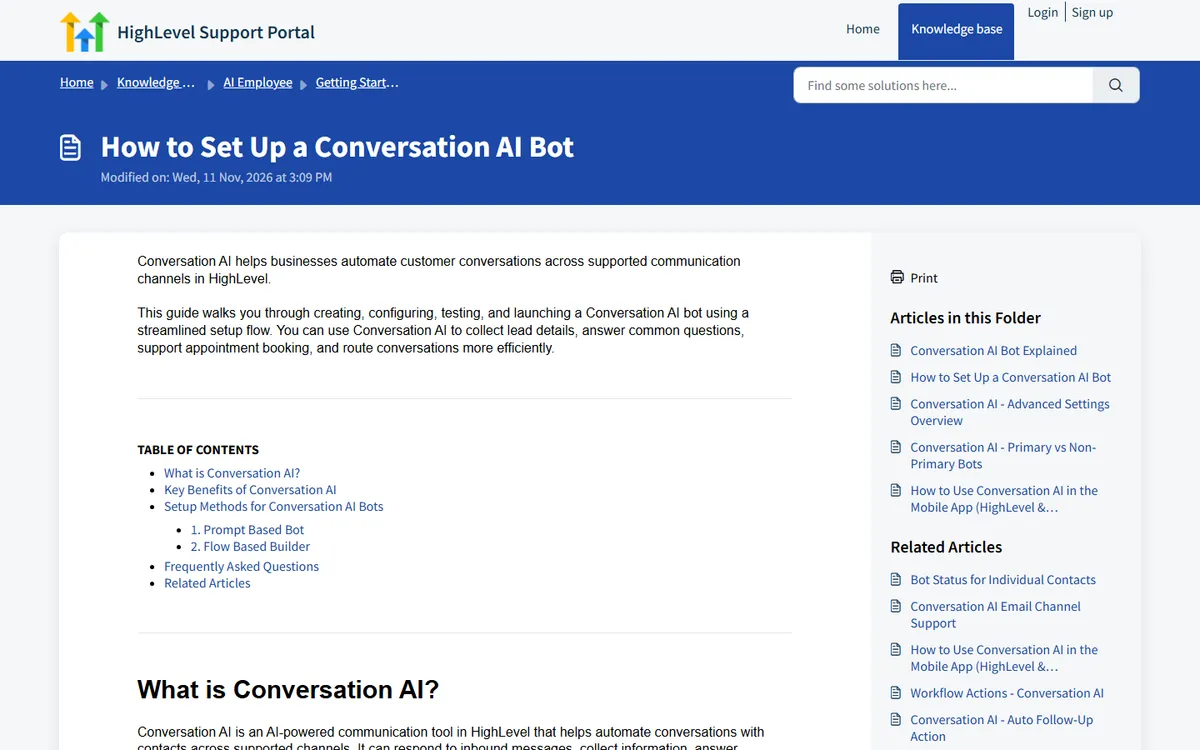 HighLevel’s Conversation AI setup guide, November 2026.
Primary and non-primary bots
HighLevel splits bots into two roles.
- Primary. Handles general inbound conversations on the channels you assign. HighLevel says one primary bot handles general inbound messages on selected channels.
- Non-primary. Used inside workflows, and responds only when a workflow invokes it.
The practical pattern: one primary bot for inbound texts and chat, and non-primary bots for specific workflows, such as a follow-up after a quote. Keep the roles clear or two bots will answer the same thread.
The three modes, and how to roll out
| Mode | What happens |
|---|---|
| Off | The bot does not respond. HighLevel says this is the default for new bots |
| Suggestive | The bot drafts replies, and a person reviews and sends each one |
| Auto-Pilot | The bot sends replies automatically based on its training, settings, goals and instructions |
Run it in Suggestive mode until you would sign your name under every draft. Then switch to Auto-Pilot on one channel, watch it for a week and add channels after. HighLevel’s help center recommends testing lead capture, FAQs, booking, unknown questions and workflow behavior before Auto-Pilot.
To pause a bot in one conversation, HighLevel’s mobile app instructions say to open the conversation, tap the top-right menu, choose Edit AI Settings and turn off Activate Bot. That is the quick way for a human to take over a thread. A separate article covers bot status for individual contacts, which I did not review in full.
Settings that change how it sounds and behaves
- Response style. Concise, Balanced or Detailed. For text I use Concise.
- Additional Instructions. Extra rules such as “ask one question at a time.” This is the cheapest fix for a bot that sounds like a form.
- Advanced controls. HighLevel lists response delays, message limits, sleep and reactivation behavior and attachment handling. The article does not give values for these, so test them.
- Bot Goals. You choose which contact details the bot collects, such as name, email and phone, and whether it books.
- Opening message and response wait time. Set in the bot basics for booking bots.
- Image responses. Supported in Auto-Pilot, but if the bot is in Suggestive mode, image processing will not activate.
- Notifications. HighLevel says you can get an email when the bot cannot answer a question. Turn that on.
Actions available on prompt based bots, per the setup article: appointment booking, workflow triggers, human handover, stop bot, transfer bot, auto follow-up and conversation summaries.
How to make it book
HighLevel’s booking article lists the steps, and here they are in my words.
- Build the calendar first. A HighLevel booking calendar must already exist.
- Create or open the bot under AI Agents, then Conversation AI.
- Set the basics: name, response wait time and opening message.
- Choose what to collect under Bot Goals.
- Turn on Appointment Booking and pick Single Calendar or Multiple Calendars.
- For multiple calendars, give each a description, optional keywords and an optional fallback calendar.
- For Services, choose which public services the bot can offer. Staff, add-ons and variations can be included.
- Add prompt instructions and training for your services, availability and booking flow. HighLevel says not to rely only on calendar descriptions.
- Decide on cancellations and reschedules, and on post-booking actions like sending only a booking link, pausing the bot or triggering workflows.
- Save and test live, especially cancellation and rescheduling.
Limits to know: Multiple Calendars and Services are prompt based only, private services are not supported, and the bot does not collect online payment during booking. If you need a deposit at booking, send a payment link as a post-booking step or take payment another way.
Start your free HighLevel trial 30-day trial · cancel anytime · keep the bonuses I may earn a commission if you sign up through my link, at no extra cost to you. DetailsAfter hours and working hours
Working Hours for Conversation AI is available through HighLevel Labs, as of the article I checked. Enable it under Settings, then Labs, by searching for Working Hours and turning on the flag. Then configure each agent: AI Agents, Conversation AI, Agents List, pick the agent, Deploy tab, Working Hours.
What you can set, per HighLevel:
- Turn on Active Hours and pick which channels follow the schedule (SMS, email, WhatsApp, Instagram, Facebook, chat widget, live chat and TikTok are listed).
- Choose Contact Timezone or Business Timezone.
- Set days and time slots, with multiple slots per day.
- Optional after-hours options: Continue Ongoing Conversations, an Off-Hours Auto-Reply, Team Notifications, Contact Tags and a Follow Up When Business Hours Resume message.
Outside the hours the agent does not actively respond on the selected channels, and Suggestive mode still generates drafts for your team. If Advanced Follow-Up also has its own hours, Working Hours takes priority for the channels it includes. Because this is Labs, features can move, so recheck before you build a client process on it.
What it costs
I keep these rates consistent with my pricing breakdown. From HighLevel’s AI Product Pricing article:
| Option | Conversation AI cost |
|---|---|
| Pay per use | Billed per million tokens, input and output separately |
| AI Employee Growth ($50 a month per sub-account) | 1,000 responses a month, and 500 messages for the Prompt Optimizer |
| AI Employee Unlimited ($97 a month per sub-account) | Unlimited under fair use, including the Prompt Optimizer |
| AI Employee Starter ($20) | Not included |
Token examples from HighLevel, per million tokens, input and output: GPT 5 $1.25 and $10.00, GPT 5 Mini $0.25 and $2.00, Claude Haiku 4.5 $1.10 and $5.50. HighLevel’s worked example: 100,000 input tokens plus 25,000 output tokens at GPT 5 rates is $0.375. I could not verify an average per-reply price, because it depends on your prompt length, knowledge base and model, so check current pricing and watch your own usage dashboard.
Texting charges are separate. LC Phone bills about $0.00747 per SMS segment, as of November 2026, plus carrier fees. When Growth responses run out, extra usage is paused until an Agency Admin enables Extra Usage. See my AI Employee post for the flat versus pay per use math.
HighLevel Conversation AI
Pros
- Replies in seconds on text, chat and social
- Books into HighLevel calendars and writes to the CRM
- Suggestive mode lets a human approve every draft
- Works inside workflows as a non-primary bot
Cons
- Multiple calendars and Services need a prompt based bot
- No online payment during booking
- Working Hours is a Labs feature
- Token costs are hard to predict without testing
- A weak prompt sends confident wrong answers fast
Compliance: texting, recording and calls
I am not a lawyer, so this is a checklist for yours.
- A2P 10DLC for SMS. US business texting needs A2P 10DLC registration, and my setup guide covers it. Without it, carriers can filter or block your messages.
- Consent and STOP. The bot does not create consent. Only text people who agreed to be texted, and honor STOP and similar words every time. Put that rule in the prompt too.
- TCPA. The TCPA covers calls and texts that use automated systems, and consent rules apply. Get a lawyer’s view for your list and your state.
- Call recording consent. This applies if the bot hands off to a voice call or you record calls. Some states need all parties to consent. My Voice AI post covers recording and the outbound call rules.
A bot that sends fast replies to the wrong people is just a faster way to annoy them. Clean consent and a clean list matter more than any prompt.
Use cases by business
Examples of how I would configure it. These are not promised results, and I am not inventing numbers.
Roofer or exterior contractor
I sell premium home exteriors in the Midwest. Leads come from web forms and texts, often with photos of a leak or damaged siding, and the person who replies first usually wins the inspection.
Sample prompt, shortened:
ROLE
You are the text assistant for [Company], a roofing and exterior
contractor in [service area]. You are an AI assistant, and you say so
if asked. Write one to three short sentences.

GOAL
Book a free inspection. If the person is not ready, keep the lead warm.

STEPS
1. Ask what is going on (leak, storm damage, replacement, siding).
2. Ask for the property address.
3. Ask if they can text one photo of the area.
4. Offer two inspection times and book the one they pick.

RULES
Never quote a price, timeline or brand. Never say an insurance claim
will be approved. Say: "The estimator will go over that at the property."
If they write STOP, stop. If they ask for a person, tag "needs-human".
A short sample thread:
Bot: Hi Dana, this is the assistant for [Company]. What is going on with the roof? Dana: Shingles blew off in the wind. Bot: Sorry to hear that. What is the address, and can you text one photo of the spot? Dana: 88 Fir Lane. Sending a photo. Bot: Thanks. I can have someone out Thursday at 10 or 2. Which works?
See CRM for roofers and roofing lead generation for the front end and production split. For the Field Services module, which I tested in beta, see my review.
HVAC and plumbing
Texts are the best channel for non-emergencies: “my AC is making a noise,” “can I get a quote on a water heater.” Use two paths: an emergency path that tags and alerts the on-call tech, and a booking path with two time options. HighLevel’s Field Services beta includes an AI receptionist that handles chat and voice, as the owner confirmed on 2026-11-16 and as I saw in my test. It is a beta, so test it on the side. See HVAC CRM and plumbing lead generation.
Dental and med spa
A text thread can reveal symptoms or medications in one reply. That is protected health information, so there is a HIPAA caution here. HighLevel sells a HIPAA add-on at $297 a month and Enterprise includes it, but I could not verify that Conversation AI is covered. Get written confirmation from HighLevel first, and until then keep the bot to hours, booking and general questions, with a hard handoff on anything clinical. Suggestive mode is a sensible default here. See CRM for dentists.
Law firm (intake rules)
A bot can collect a name, a number and a one-line reason. Rules I would write in: it must say it is an AI assistant, it cannot give legal advice or say whether there is a case, it does not create an attorney-client relationship, and it hands off immediately on deadlines, arrests or safety issues. Check your bar rules on conflicts and communications before launch. Suggestive mode, where staff approve each draft, is a good fit. See CRM for law firms.
INTAKE RULES
You are an AI assistant for [Firm]. You cannot give legal advice or
say if someone has a case. Replying does not create an attorney-client
relationship. Collect only name, phone, email and one sentence about
the matter. If the person mentions a deadline, an arrest or danger,
say "I am flagging this for the team right now" and tag "urgent-intake".
Real estate
New inquiries from a listing portal go cold fast. Have the bot answer in seconds, ask the timeline and the neighborhood, and book a call or showing on the right calendar. Use multiple calendars if you have several agents (prompt based bots only). Keep it away from pricing advice or anything that reads as a promise. Sample reply: “Thanks for asking about the home on Maple. Are you hoping to see it this week or just getting started?” See real estate CRM and speed to lead.
Agency reselling it
Clone a working bot from client to client with a snapshot, and change the knowledge base and prompt each time. See GoHighLevel snapshots. AI usage can be rebilled (Unlimited passes it through at cost, and your own markup needs the $497 Founder plan), and Conversation AI has its own rebilling setting. Package the bot with the stack in GoHighLevel white label, and see how to start an AI agency for the offer. Start every new client in Suggestive mode for a week. It shows the owner the quality before it speaks for them.
A testing checklist before Auto-Pilot
- A normal lead, start to finish, with a booking.
- An off-topic question. It should hand off, not guess.
- A price question. It should stay inside your rules.
- A rude message. It should stay calm and offer a person.
- A STOP message. It must stop.
- A booking cancellation and a reschedule.
- A photo, if you use image responses (Auto-Pilot only).
- An after-hours message, if you use Working Hours.
When Conversation AI is not the right choice
- You only need an instant text after a missed call. A workflow does that for less. See missed call text back.
- Conversations are sensitive. Keep a human in the loop, or use Suggestive mode only.
- You need a support desk. A dedicated help desk tool does ticketing better.
- Your list is not opted in. A faster bot does not fix a consent problem.
- You need payments inside the chat. The bot does not collect online payment during booking.
Two ways to run HighLevel
Path 1: your own HighLevel account. Start a trial and build a bot in Suggestive mode.
Start your 30-day extended free trial 30-day trial · cancel anytime · keep the bonuses I may earn a commission if you sign up through my link, at no extra cost to you. DetailsPath 2: prefer it set up for you? My Growth Plan is $97 a month for white-label HighLevel already set up for local service businesses. See the Growth Plan page. AI usage is billed separately, so ask what is included.
Next steps
- Build the calendar and a short knowledge base.
- Create a prompt based bot with one goal.
- Run Suggestive mode for a week and edit the prompt.
- Add a human handoff and notifications, then switch one channel to Auto-Pilot.
- Check your usage after two weeks and pick the plan that matches it.