 Jonathan Blake

If you searched for a CRM for dentists, you probably have one of two problems. Either new patients are not coming in the door, or the patients you already have are slipping away. Those are different problems, and dental practices tend to buy software for the second one while suffering from the first.
I sold face to face since 2015, ran a tree service for six years, and now co-own The Lead Venture, an agency that runs on HighLevel. I am not a dentist and I have never run a practice, so I will stick to what I know: how leads get answered, followed up and booked. Where the rules get serious, I will tell you to ask someone qualified.
Short answer: if you want a tool that sits next to your practice management software and handles patient communication, look at a dental-specific option like Weave, RevenueWell or Lighthouse 360. If your bigger problem is new-patient leads, missed calls and follow-up, I recommend GoHighLevel, with a careful look at HIPAA first.
What a dental CRM actually needs to do
A dental office is a small business with an unusual set of leaks. These are the ones I hear about most:
- The front desk is busy with a patient. The phone rings while someone is checking in, and a new patient hears voicemail. Most people do not leave a message. They call the next office.
- Web leads wait. Someone fills out a form for a consult at 8 pm, and the reply comes at noon the next day. They have already booked elsewhere.
- Treatment plans go cold. The patient says they will think about it, and nobody follows up.
- Hygiene recall is uneven. Overdue patients are sitting in your system and nobody reaches out on a schedule.
- Reviews are an afterthought. A strong happy-patient moment passes without a request.
A dental CRM that keeps perfect records but lets the new patient call go to voicemail is solving the wrong problem.
Do this today: ask your front desk how many calls went unanswered last week. If nobody knows, that is your first finding.
Dental-specific tools vs GoHighLevel
I have not listed competitor prices. Dental vendors typically quote by practice size and add-ons, and numbers change, so check each vendor directly. I describe each tool qualitatively, based on how the vendors describe themselves, and you should confirm current features in a demo.
GoHighLevel
- Strength: Lead capture, texting, missed-call text back, follow-up, reviews, AI
- Weak spot: Not a dental practice management or charting system
- Pricing: Flat, from $97/month
Weave
- Strength: Phones and patient messaging for dental offices
- Weak spot: Priced by practice, so you need a quote
- Pricing: Get a quote
RevenueWell
- Strength: Patient engagement, recall and reactivation
- Weak spot: Aimed at existing patients more than lead generation
- Pricing: Get a quote
Lighthouse 360
- Strength: Patient communication and reputation tools for dental
- Weak spot: Check how much of the marketing side is included
- Pricing: Get a quote
| Item | GoHighLevel | Weave | RevenueWell | Lighthouse 360 |
|---|---|---|---|---|
| Built for dental | No, general local business | Yes | Yes | Yes |
| Practice management integration | Limited, check what connects | Core selling point, confirm yours | Core selling point, confirm yours | Core selling point, confirm yours |
| New-patient lead capture and follow-up | Strong | Check current features | Lighter | Check current features |
| Recall and reactivation | Yes, you build the workflows | Yes | Strong focus | Yes |
| Texting and missed-call text back | Built in | Check current features | Check current features | Check current features |
| Reviews | Built in | Check current features | Check current features | Strong focus |
| HIPAA position | Add-on, ask for a BAA | Ask for a BAA | Ask for a BAA | Ask for a BAA |
| Pricing | Flat, from $97/month | Quote | Quote | Quote |
Features change, so treat this as a starting point.
Who each one fits
Weave fits a practice that wants the phone system, texting and patient messaging in one place and wants it to talk to the practice management software.
RevenueWell fits a practice that wants to work its patient list: recall, reactivation and engagement with people already in the chart.
Lighthouse 360 fits a practice that wants a dental-specific communication and reputation suite from one vendor.
GoHighLevel fits the owner or marketer whose problem is the front end: the call answered, the lead texted, the exam booked and the follow-up done. It also fits agencies that serve dentists. See my full GoHighLevel CRM breakdown for what is inside it.
Do this today: write down your top two problems (new patients, recall, reviews, no-shows). Choose the tool that fixes the first one. If reviews are the main one, I compared review tools in Birdeye alternatives.
HIPAA: read this before you move any patient data
I am not a lawyer and this is not compliance advice. But I have seen enough owners skip this section, so here is how I think about it.
HIPAA is a set of U.S. rules about protected health information (PHI). If a vendor creates, receives, stores or sends PHI for your practice, that vendor is generally a business associate, and the rules expect a signed business associate agreement (BAA) between you.
Never tell yourself a tool is HIPAA compliant because the sales page says so. Compliance is a signed agreement plus how you use the tool.
What I would check, in order:
- Is there a BAA, and is it signed? No BAA, no patient health information in that system. Full stop.
- What does the BAA cover? Some vendors cover only certain features. Ask which features are in scope and which are not, including texting, email, calling, call recording and AI.
- What does it cost? On HighLevel, the HIPAA add-on is listed at $297 a month as of late 2026 in my pricing breakdown. Verify the current price and terms with HighLevel, because both can change.
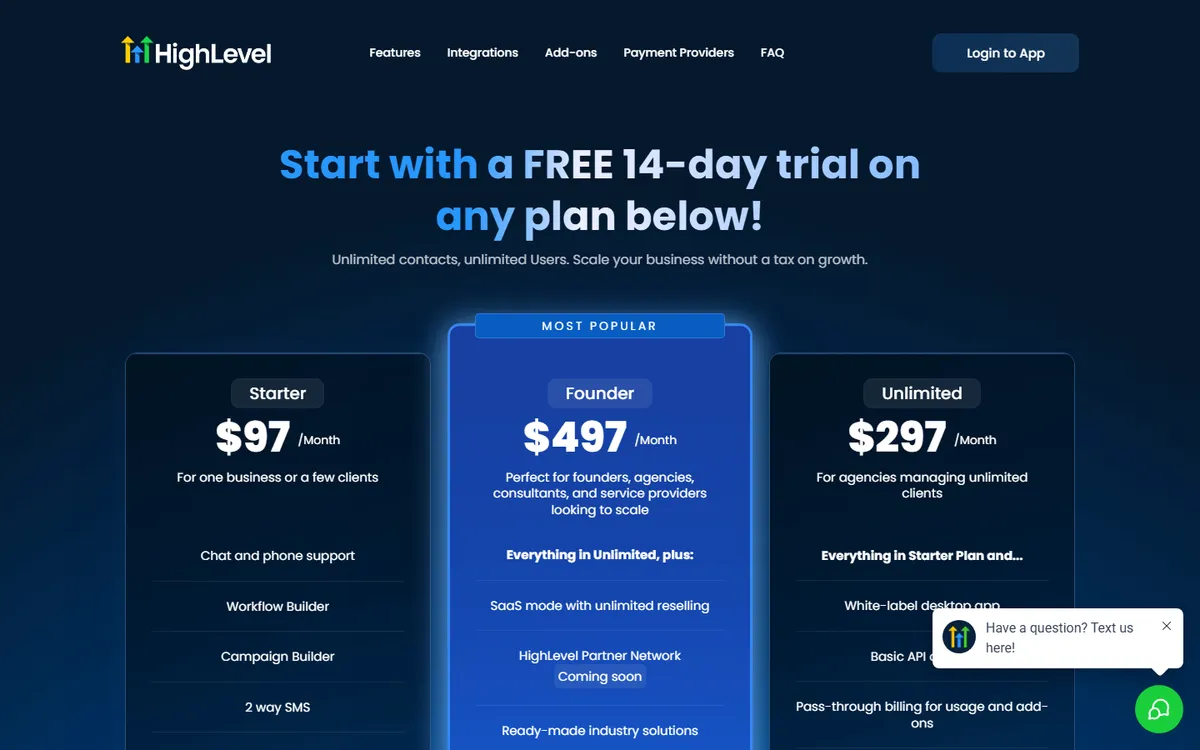 HighLevel’s pricing page, November 2026. The HIPAA add-on is priced separately.
- What actually goes in? The safest habit is data minimization. A lead form with name, phone and “new patient exam” is very different from a form that asks about symptoms or insurance.
- Who can see it? Use individual logins, turn on two-step sign-in and remove access when staff leave.
- Who signs off? Your compliance officer or healthcare attorney should approve the setup in writing.
There is also a middle path. Many practices keep PHI in their practice management system and dental-specific tools, and use GoHighLevel only for the marketing side: ad leads, general inquiries, reactivation messages with no clinical detail and review requests. That reduces how much PHI ever lands in the CRM. Whether that is enough for your practice is a question for your compliance officer. The same split between practice software and marketing software shows up in CRM for law firms.
My recommendation
Pick the tool for the leak you actually have, not the one with the longest feature list.
For a practice that is short on new patients, the leak is usually response and follow-up. That is where GoHighLevel is strong: one account handles the phone number, texting, missed-call text back, review requests, a pipeline and an AI agent that can answer questions and book. For a practice that is short on recall and loyalty, a dental-specific tool tied to your charts may be the better first purchase.
The honest limits: GoHighLevel is not a practice management system, it will not chart or handle insurance, and it requires HIPAA care. If you are not willing to do the compliance work, use a dental-specific vendor that will sign a BAA and walk you through it.
Start your free HighLevel trial 30-day trial · cancel anytime · keep the bonuses I may earn a commission if you sign up through my link, at no extra cost to you. DetailsA dental pipeline in plain words
If you go the GoHighLevel route for new-patient marketing, here is the pipeline I would build. Use Opportunities and create one called “New Patients.”
- New Lead
- Contacted
- Exam Booked
- Exam Done
- Treatment Plan Presented
- Follow-Up
- Accepted
- Lost
Add a custom field for lead source, so you can tell which ads, Google profile calls and referrals actually turn into patients. Keep clinical details out of the fields.
Automations worth building
Missed-call text back. When a call goes unanswered, send a text within seconds. Keep it generic and friendly.
Speed-to-lead reply. When a web form comes in, text back right away with two appointment options and alert the front desk. I wrote up the research in my speed to lead guide.
Appointment reminders and no-show recovery. A reminder the day before and a short text two hours before. If they miss, a friendly reschedule text within 15 minutes.
Reactivation. A short, general message to people who have not been in for a while, with no clinical details. My database reactivation guide covers the full play.
Reviews. Two days after a visit, send one review request with your Google link.
For after-hours coverage, see my dental answering service guide, which has a copy-paste AI prompt you can adapt. Review any phone, recording or AI setup with your compliance officer first.
Do this today: build the pipeline and the missed-call text first. They take under an hour and the rest hangs off them.
Texting rules for dental offices
This is not legal advice. Register for A2P 10DLC before you send business texts in the U.S. Include opt-out language, get texting consent on your form, and honor STOP immediately. Keep message content free of treatment details unless your compliance officer has cleared the channel for it.
Two ways to get this
Path 1: your own HighLevel account. You build it yourself using this guide.
Start your 30-day extended free trial 30-day trial · cancel anytime · keep the bonuses I may earn a commission if you sign up through my link, at no extra cost to you. DetailsPath 2: prefer it set up for you? My Growth Plan is $97 a month: white-label HighLevel already set up for local service businesses, so you skip the build. Ask about HIPAA needs before you assume it fits a dental practice. See the details on the bonuses page.
If you want to see how other industries compare, browse my CRM by industry guide.
Quick wins
Want clients this month? Start here
Set up your own house first. One clear offer for one niche, a simple site, a booking link and your own HighLevel account running the same automations you'll sell. Prospects trust what they can try.
Start with people who already know you
Past employers, old customers, friends who own businesses. Tell them exactly what you set up for dental practices and ask for 20 minutes.
Do daily outreach
Calls, emails and DMs to a tight list in one niche. Volume and follow-up beat clever copy.
Demo, don't describe
Build a quick AI agent or missed-call text-back demo in your own HighLevel account and let them try it on the call.
Post what you build
Short screen recordings of real automations. One a day on the platform your buyers use.
Partner with people who own your buyers
Web designers, bookkeepers and software resellers already have the relationship. Trade introductions.
Answer every lead in under a minute
Practice what you sell. Set up your own speed-to-lead automation first.
Work a local area in person
- Pick one area and walk into ten businesses in a row. Ask for the owner, keep it to two minutes and leave a card.
- Bring a one-page printout that shows the problem you fix (missed calls, slow follow-up, no reviews) with their name on it.
- Go back a week later. Most first visits are about being remembered, not closing.
Ask for introductions, not referrals
"Know anyone who could use this?" gets a polite "I'll think about it." Asking to be introduced to a specific kind of person gets names. Set it up when they sign:
"If this works the way I think it will, would you be against introducing me to one or two other dental practices you know? I'll give them a a free missed-call audit."
Then follow up once they're seeing results. With a client you get along with, a little humor works:
"So are you keeping me a secret on purpose, or do you just not like your friends?"
Only joke like that with clients you know well. With everyone else, keep it simple and thank them either way.