 Jonathan Blake

I have sold face to face since 2015, and I ran a tree service for six years. I am not a course creator, so I will not pretend to be one. What I do know is how clients who sell coaching and courses get stuck: they pick a platform for the course, then bolt on four other tools to handle everything that happens before and after someone buys.
That is the pattern behind most searches for Kajabi alternatives. Sometimes the answer is a cheaper course tool. Sometimes it is one system for the whole business. I will walk through both.
Short answer: Podia, Teachable or systeme.io if you want a simpler or cheaper course platform. GoHighLevel if you also run sales calls, texting and booking and want one system. Kajabi itself if it is working and you are earning enough to cover it.
I make part of my living from HighLevel and co-own an agency, The Lead Venture, that runs on it. If you sign up through my link I get paid. I will say plainly where Kajabi-style tools are the better choice. For a direct head-to-head, see GoHighLevel vs Kajabi.
Why people leave Kajabi
- Price. Kajabi’s pricing page lists Basic at $179 a month, Growth at $249 and Pro at $499, with lower monthly rates on annual billing.
- Limits at each step. Basic lists 2,500 contacts and 5 products, Growth lists 25,000 contacts and 50 products, and extra contacts are sold in blocks of 25,000 for $125 a month.
- Pre-sale and post-sale tools are thin. Sales calls, texting and a pipeline are not what it is built around.
- You are paying for the all-in-one before you need it. If you are testing your first course, the entry plan is a lot to commit to.
Be honest with yourself about the last one. The cheapest platform is the one you actually finish building your course on.
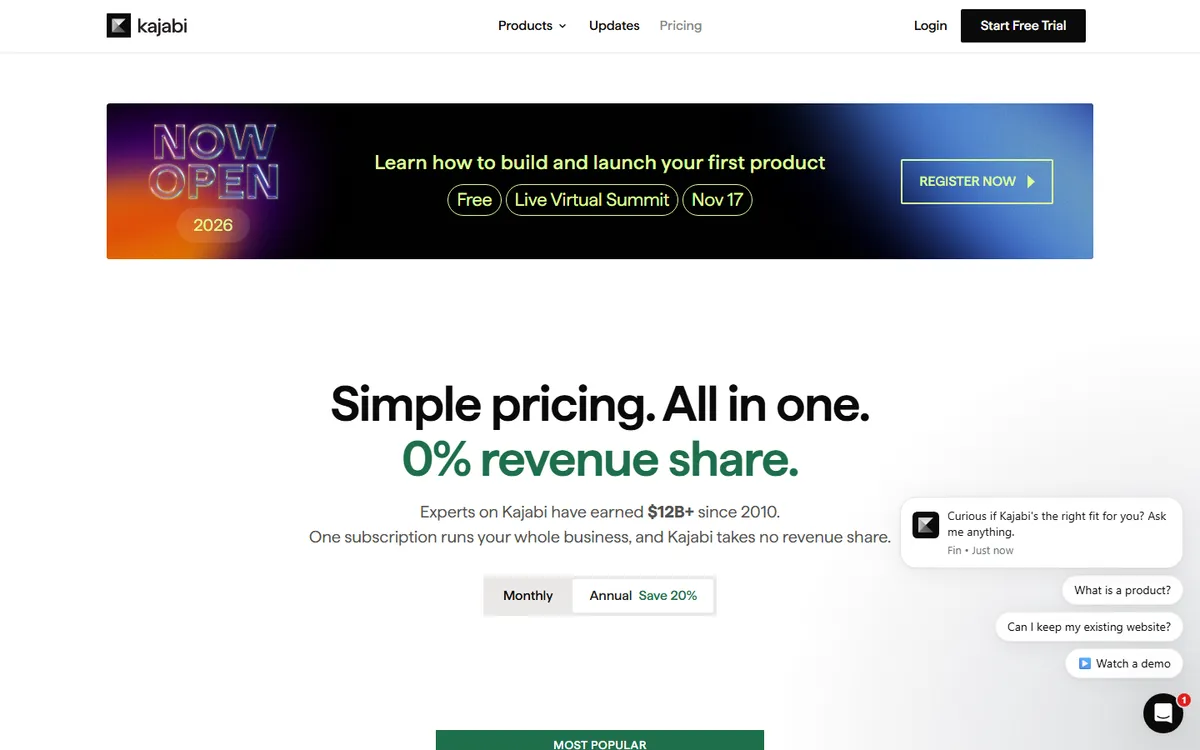 Kajabi’s pricing page, November 2026.
How I ranked these
- Verified price and fees. Only numbers I could read on the vendor’s own pricing page.
- Fit for a course or coaching business. Hosting, checkout and student experience.
- What is around the course. Sales calls, texting, booking and a pipeline.
- Who it is wrong for.
Kajabi alternatives at a glance
- 1 Read the full breakdownSimple course tool
Podia
- Mover $42 a month billed yearly, 5% fee
- Shaker $84 a month, no Podia fee
- No permanent free plan
- 2 Read the full breakdownEstablished course platform
Teachable
- Starter $39 a month, 7.5% fee
- Builder $89 a month
- Strong course focus
- 3 Read the full breakdownBudget pick
systeme.io
- Free plan with 1 course
- Paid from $17 a month
- Thinner automation
- 4 Read the full breakdownCommunity-first
Skool
- Hobby $9 a month, 10% fee
- Pro $99 a month, 2.9% fee
- Built around community
- 5 Read the full breakdownCourse plus sales system
GoHighLevel
- Memberships, community, CRM, texting and calendars
- Starter is $97 a month
- Less polished for students
- 6 Read the full breakdownIf it is working
Kajabi (stay)
- Basic $179 a month
- Simple all-in-one for courses
- Do not move for the sake of it
1. Podia: a simpler course platform
Best for: someone who wants to sell courses, downloads or a membership with minimal fuss.
Why switch: the entry price is much lower than Kajabi’s, and the plans are easy to understand.
What you give up: the 5 percent platform fee on the entry plan, and less depth beyond the course itself.
Pricing: Mover is $42 a month billed yearly or $49 billed monthly, Shaker is $84 billed yearly or $99 monthly, and Earthquaker is $150 billed yearly or $179 monthly. Only Mover has a Podia fee, at 5 percent, plus your payment processor’s own fee. There is no permanent free plan, only a 14-day trial, per Podia’s pricing page in 2026.
Podia
Pros
- Entry price is much lower than Kajabi's
- Plans are easy to understand
- Sells courses, downloads and memberships
Cons
- 5 percent platform fee on the entry plan
- Less depth beyond the course itself
2. Teachable: for course sellers
Best for: a course-first business that wants an established platform focused on selling and delivering courses.
Why switch: it is built around the course itself, and the entry plan costs less than Kajabi.
What you give up: the Starter plan carries a 7.5 percent transaction fee, and it is not a CRM or a sales system.
Pricing: Starter is $39 a month billed monthly or $29 billed yearly, Builder is $89 or $69, and Growth is $189 or $139. The page lists 0 percent transaction fees on Builder and Growth when you use Teachable Payments. There is no free plan, per Teachable’s pricing page in 2026.
Teachable
Pros
- Built around selling and delivering courses
- Entry plan costs less than Kajabi
- 0 percent transaction fees on Builder and Growth with Teachable Payments
Cons
- 7.5 percent transaction fee on Starter
- Not a CRM or a sales system
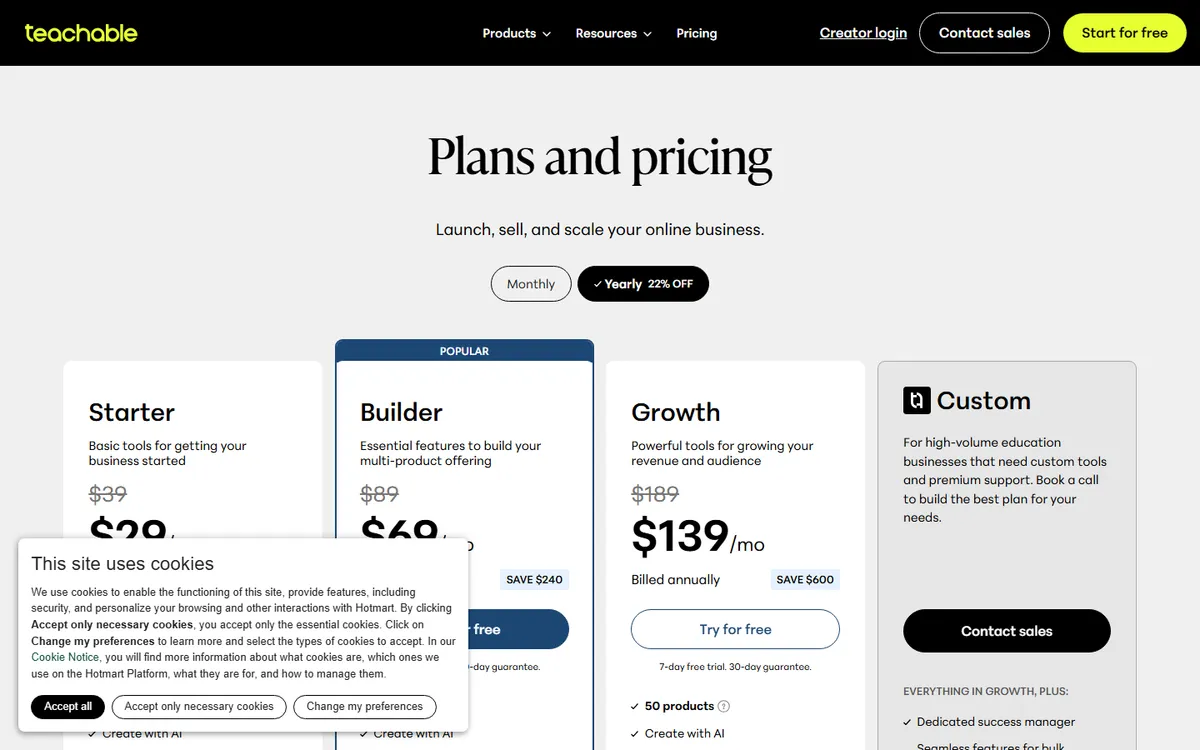 Teachable’s pricing page, November 2026.
3. systeme.io: the budget option
Best for: a creator testing a first offer who does not want to pay before the first sale.
Why switch: the free plan on systeme.io’s pricing page lists 2,000 contacts, 3 sales funnels, 1 course, 500 students and unlimited emails sent.
What you give up: automation depth. The free plan lists 1 automation rule, and the platform is thinner than a dedicated course product.
Pricing: Free is $0, Startup is $17 a month, Webinar is $47 and Unlimited is $97, per systeme.io’s pricing page in 2026.
systeme.io
Pros
- Free plan with 2,000 contacts, 3 funnels and 1 course
- Paid plans start at $17 a month
Cons
- Thinner automation than a dedicated course product
- 1 automation rule on the free plan
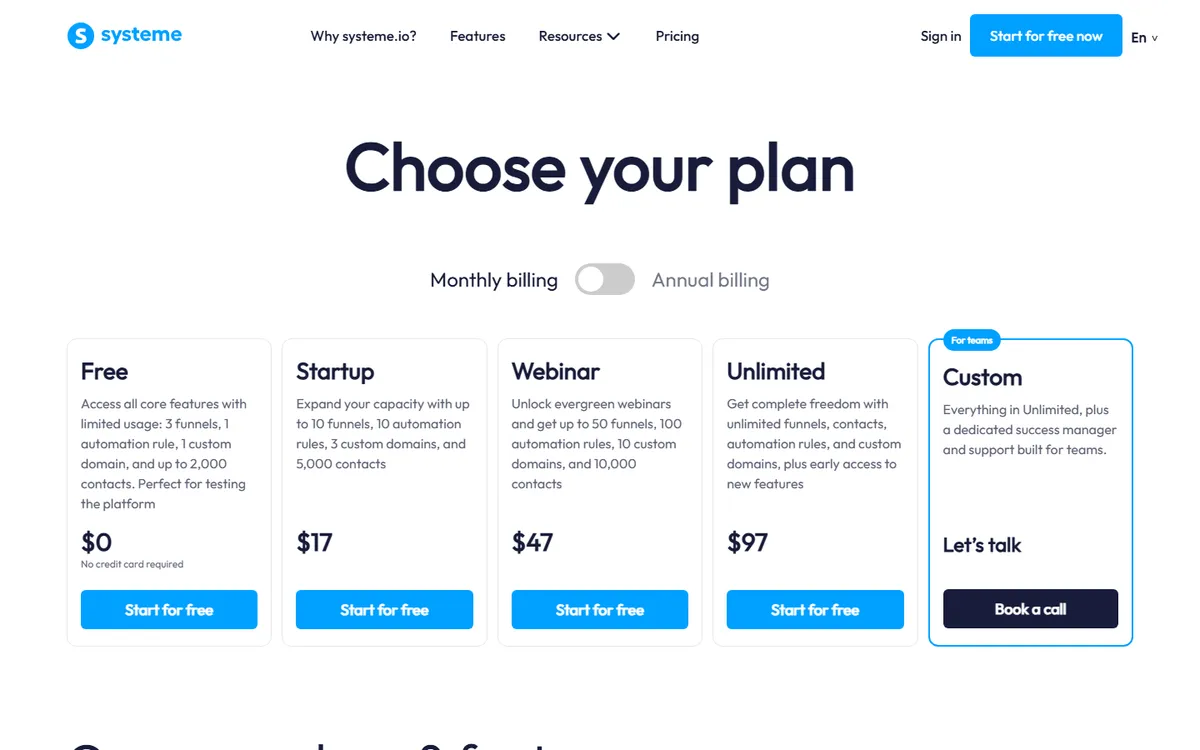 systeme.io’s pricing page, November 2026.
4. Skool: if community is the product
Best for: a business built around a paid community rather than a course library.
Why switch: it is designed around the community itself, with a low entry price.
What you give up: a transaction fee of 10 percent on Hobby, and course and marketing tools that are lighter than Kajabi’s.
Pricing: Hobby is $9 a month with a 10 percent transaction fee, and Pro is $99 a month with a 2.9 percent transaction fee, per Skool’s pricing page in 2026.
5. GoHighLevel: the course plus the system around it
Best for: a coach or course seller who also runs sales calls, texts leads, books appointments and manages a pipeline, and wants all of it in one place.
Why switch: HighLevel has memberships, courses and community features next to the CRM, texting, calendars and automation. A lead books a call, gets reminders, goes into a pipeline, buys the program and lands in the member area, all on one contact record. For someone who sells high-ticket coaching by phone, that follow-up matters more than the course player.
What you give up: polish for your students. Kajabi is easier to start with than GoHighLevel, and I’d say that even though I get paid when you pick the other one. The course and community tools in HighLevel do the job, but they are not the reason people buy it, and the setup takes real time. Calls, texts and email are billed by usage on top of the plan, which I explain in GoHighLevel pricing.
Who should NOT pick it: if you have a course and a mailing list and nothing else, a course-first tool is simpler. If you are not selling by call or text and you will not use the CRM, you are paying for a platform you do not need.
Pricing: Starter is $97 a month, per HighLevel’s pricing page in 2026. Usage is billed separately.
GoHighLevel for course sellers
Pros
- Memberships, community, CRM, texting and calendars on one contact record
- Strong follow-up for high-ticket coaching sold by call
Cons
- Less polished for students than Kajabi
- Usage billed on top of the $97 plan
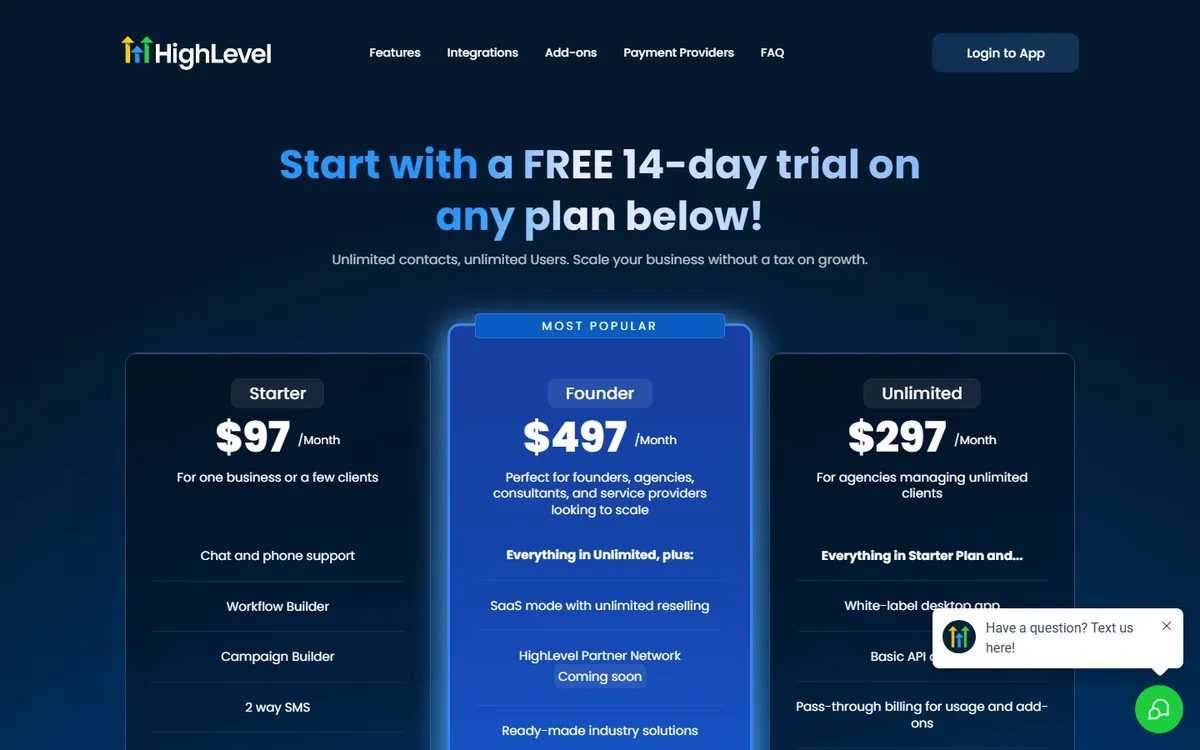 GoHighLevel’s pricing page, November 2026.
6. Staying on Kajabi is a real option
Best for: a course business that is earning and wants one simple tool.
Why stay: the all-in-one is easy to run, and moving platforms costs you weeks you could spend selling.
What you give up by staying: the price, plus the contact and product limits at your tier.
Pricing: Basic is $179 a month ($143 billed annually), Growth is $249 ($199) and Pro is $499 ($399), per Kajabi’s pricing page in 2026.
What to check before you move a course
Moving a course business is more work than moving a booking link, because real people are logged in to what you built. Check these first.
Your students. Do you know how many you have, which products each has access to, and how they log in today? If not, find out before you pick anything.
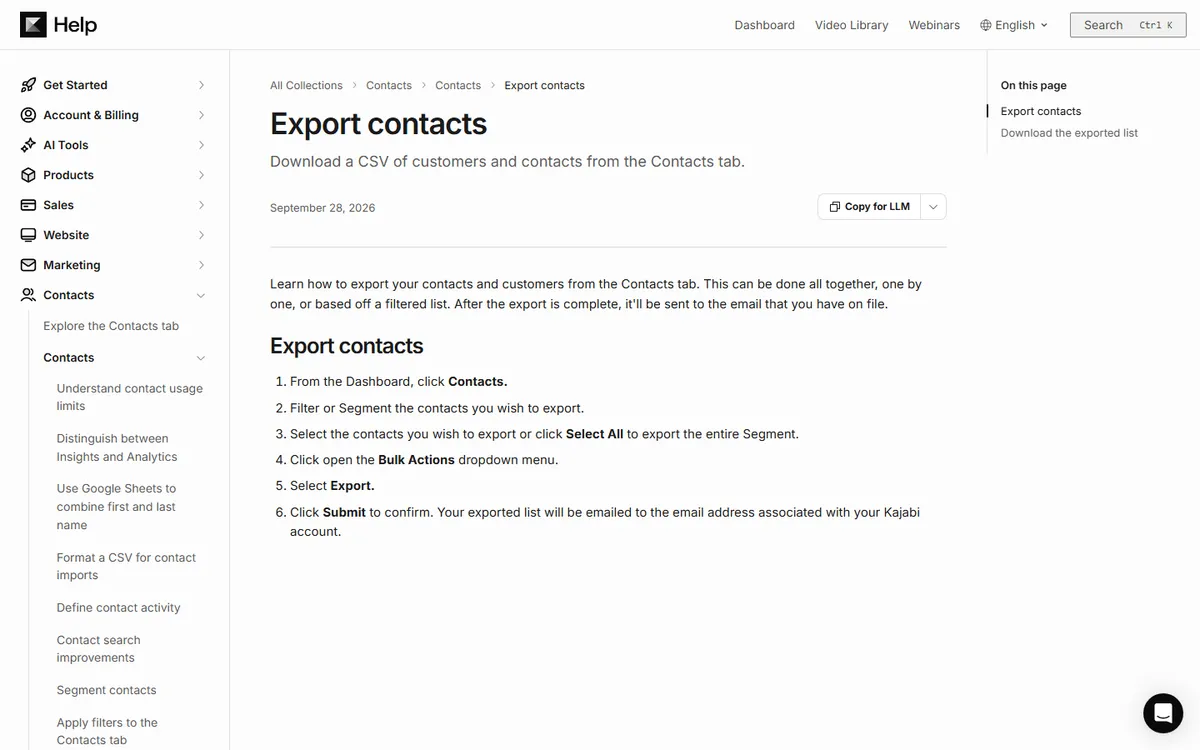 Kajabi’s own contact export article, November 2026.
Your payments. Subscriptions and payment plans are the hard part. A student partway through a payment plan cannot be moved without a plan of your own, so list who is on what.
Your content. Keep your original video files and documents somewhere you control. If your only copy lives inside a platform, a move is risky.
Your fees. A low monthly price with a transaction fee can cost more than a higher flat price once sales grow. The numbers I verified: Podia lists 5 percent on its entry plan, Teachable lists 7.5 percent on Starter, and Skool lists 10 percent on Hobby. Work out your own sales and do the math both ways.
Your timing. Do not move in the middle of a launch. The week after a cohort ends is usually the calmest time.
I come at this as someone who sells services, not courses, so take the course-specific advice as a starting point and ask other creators what they run. Where I can add something is the part around the course. In my experience, the creators who struggle are rarely stuck on how to host a video. They are stuck on what happens between someone saying they are interested and someone paying, and that is where texting, reminders and a pipeline help. If you handle that well already, you probably do not need to switch.
Quick comparison
Podia
- Best for: Simple courses and downloads
- Skip if: You need a CRM or sales system
Teachable
- Best for: Course-first sellers
- Skip if: You want no transaction fee on the entry plan
systeme.io
- Best for: Testing an offer cheaply
- Skip if: You need deep automation
GoHighLevel
- Best for: Courses plus calls, texting and a pipeline
- Skip if: You only need a course area
| Option | Best for | Starts at | Biggest catch |
|---|---|---|---|
| Podia | Simple courses and downloads | $42/month billed yearly | 5 percent fee on entry plan |
| Teachable | Course-first sellers | $39/month billed monthly | 7.5 percent fee on Starter |
| systeme.io | Testing an offer cheaply | Free, paid from $17/month | Thinner automation |
| Skool | Paid communities | $9/month | 10 percent fee on Hobby |
| GoHighLevel | Courses plus calls, texting and a pipeline | $97/month | Less polished for students |
| Kajabi (stay) | A course business that is earning | $179/month | Price and tier limits |
If you are moving to GoHighLevel: the migration checklist
- Export your student list. Download the CSV from Kajabi and keep a copy.
- Download your content. Videos, PDFs and lesson text. Keep your original files in a folder.
- Map your offers. List each product, price and who has access to what.
- Rebuild the member area. Create the course structure and upload lessons. Do one course first.
- Reconnect payments. Set up checkout and test it with a small real purchase.
- Import students and grant access. Make sure each person has the right access before they log in.
- Rebuild emails and follow-up. Welcome sequence, a text for new buyers and a sales follow-up for leads.
- Tell your students. Send a short, clear message about the move, with the new login link, then keep the old site up for a while.
Automations and pages do not transfer between platforms, so budget real time to rebuild. My GoHighLevel setup guide covers the first week.
How to pick one this week
If you sell only courses, start with Podia, Teachable or systeme.io. If you sell coaching through calls and want texts, reminders and a pipeline, add up what the extra tools cost you and compare it to one system. If Kajabi is working for you, you do not need to move.
If you want the one system without building it yourself, my Growth Plan is white-label HighLevel at $97 a month, set up for you. Details are on the bonuses page.
Related guides in the same series: Calendly alternatives, Mailchimp alternatives, ClickFunnels alternatives, HubSpot alternatives and ActiveCampaign alternatives.
The 30-day extended free trial through my link is enough time to build one member area and wire the follow-up before you commit.
Quick wins
Want clients this month? Start here
Set up your own house first. One clear offer for one niche, a simple site, a booking link and your own HighLevel account running the same automations you'll sell. Prospects trust what they can try.
Start with people who already know you
Past employers, old customers, friends who own businesses. Tell them exactly what you set up for coaches and course creators and ask for 20 minutes.
Do daily outreach
Calls, emails and DMs to a tight list in one niche. Volume and follow-up beat clever copy.
Demo, don't describe
Build a quick AI agent or missed-call text-back demo in your own HighLevel account and let them try it on the call.
Post what you build
Short screen recordings of real automations. One a day on the platform your buyers use.
Partner with people who own your buyers
Web designers, bookkeepers and software resellers already have the relationship. Trade introductions.
Answer every lead in under a minute
Practice what you sell. Set up your own speed-to-lead automation first.
Work a local area in person
- Pick one area and walk into ten businesses in a row. Ask for the owner, keep it to two minutes and leave a card.
- Bring a one-page printout that shows the problem you fix (missed calls, slow follow-up, no reviews) with their name on it.
- Go back a week later. Most first visits are about being remembered, not closing.
Ask for introductions, not referrals
"Know anyone who could use this?" gets a polite "I'll think about it." Asking to be introduced to a specific kind of person gets names. Set it up when they sign:
"If this works the way I think it will, would you be against introducing me to one or two other coaches and course creators you know? I'll give them a free funnel and follow-up review."
Then follow up once they're seeing results. With a client you get along with, a little humor works:
"So are you keeping me a secret on purpose, or do you just not like your friends?"
Only joke like that with clients you know well. With everyone else, keep it simple and thank them either way.