 Jonathan Blake

If you work on roofs, siding, windows or any job that might turn into a dispute or an insurance claim, photos are your proof. CompanyCam is the name most contractors know, and it is not cheap, so it makes sense to look around.
I sell premium home exteriors for a living right now, so photos are part of my week, and I ran a tree service for six years before that. I am also a HighLevel affiliate. I will give you the real options and tell you when CompanyCam is still the right call.
Short answer: if you want the most polished tool, stay on CompanyCam. If you mostly want timestamped photos for a few dollars a user, look at Timemark. If you need plans and daily reports too, look at Fieldwire or Raken. The best photo app is the one your crew opens on every job without being asked.
How I picked these
- Does it actually solve photo documentation? Timestamps, organization by job and a way to share.
- Can I state the price from the vendor’s own page? If not, I say so.
- What do you give up compared with CompanyCam?
- Will a crew use it? A tool nobody opens is worth nothing.
I did not test each app on a live job for this post. I describe what each vendor says it does, and I mark billing periods where the page showed them.
CompanyCam alternatives at a glance
- 1 Read the full breakdownCheapest
Timemark
- Best for: small crews that mostly need timestamped photos
- Give up: CompanyCam's polish and job tools
- Price: Plus $5 and Business $7 per user per month
- 2 Read the full breakdownPlans and tasks
Fieldwire
- Best for: teams that need plans, tasks and photos together
- Give up: a simple photo-first app
- Price: Pro $39, Business $64, Business Plus $89 per user per month, billed annually
- 3 Read the full breakdownDaily reports
Raken
- Best for: crews that need daily reports and time tracking
- Give up: a light, quick photo app
- Price: Basic $23 and Performance $59 per user per month, billed annually, 3 user minimum
- 4 Read the full breakdownFree
A shared phone folder
- Best for: solo owners just starting out
- Give up: structure, timestamps and search
- Price: free
- 5 Read the full breakdownThe benchmark
CompanyCam
- Best for: contractors who want one polished tool
- Give up: a low price
- Price: Core $63, Crew $129, Scale $199 a month, billed annually
What CompanyCam costs, as the baseline
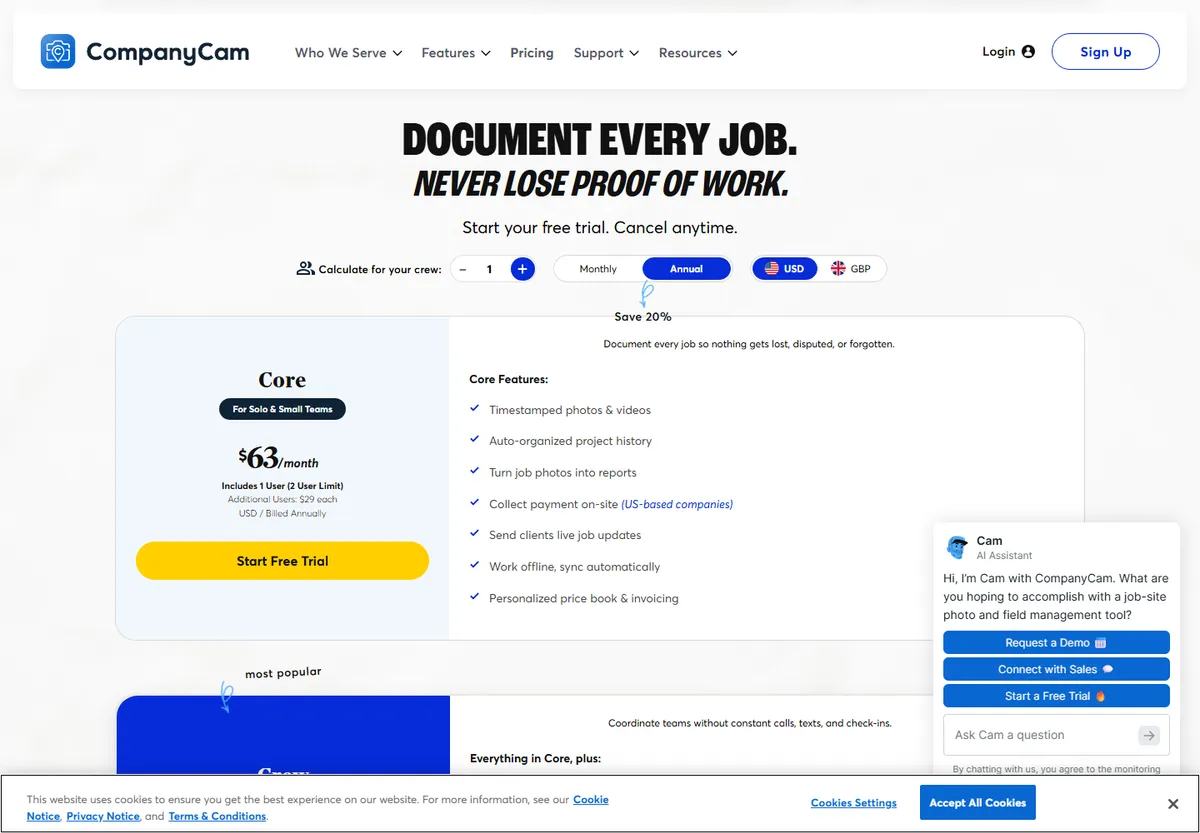 CompanyCam’s pricing page, November 2026. The annual toggle was on.
CompanyCam’s pricing page lists three plans with prices and an Enterprise plan on request:
| Plan | Price (annual toggle on) | Users included | Extra users |
|---|---|---|---|
| Core | $63 a month | 1 (2 user limit) | $29 each |
| Crew | $129 a month | 3 | $29 each |
| Scale | $199 a month | 3 | $29 each |
| Enterprise | Talk to sales | 50 or more | Ask |
The page says annual saves 20 percent, so monthly billing costs more. It also lists a Marketing Suite add-on with two unlabeled numbers, so check that yourself.
1. Timemark
Best for: small crews that mostly need timestamped, GPS-stamped photos and do not need a full job tool.
What you get: Timemark is a photo documentation app that stamps the time and place on each photo. Its pricing page shows a free plan limited to 100 photos and 3 projects, Plus at $5 per user per month (removes the Timemark watermark, saves original photos and backs up to OneDrive and Google Drive) and Business at $7 per user per month (unlimited projects, team billing and a much higher photo limit). Enterprise is listed as coming soon. Videos count against the photo limit.
What you give up: the job features CompanyCam adds, such as checklists, reports and client updates. The page did not show whether the prices are monthly or annual in the text I read, so confirm on the page.
Pricing: from $5 per user per month on Plus.
2. Fieldwire
Best for: teams that need plans, tasks and photos together, such as larger renovation or commercial jobs.
What you get: photos are included on every Fieldwire plan, including the free Basic plan, which is limited to 5 users, 3 projects and 100 sheets. Per user per month, billed annually, the page lists Pro at $39, Business at $64 and Business Plus at $89. Photo metadata stamps start on Pro.
What you give up: simplicity. It is a project tool first. For a roofing rep who just wants to snap photos and move on, it is more than you need.
Pricing: free Basic, then $39 and up per user per month billed annually.
3. Raken
Best for: crews that need daily reports, time tracking and photos together.
What you get: Raken’s pricing is per user, not per project, and photos and videos are included. Billed annually, Basic is $23 per user with unlimited projects, and Performance is $59 per user, adding time tracking, production tracking, safety and quality tools and insights dashboards. The page shows a 3 user minimum: $69 a month for 3 users on Basic and $177 on Performance, with volume discounts at 5 and 10 users. Above 10, contact sales.
What you give up: a lightweight photo-first experience, and monthly billing. The page says prices are billed annually.
Pricing: $23 to $59 per user per month billed annually, 3 user minimum.
4. A shared phone folder
Best for: solo owners and very small crews who just need somewhere to put photos.
What you get: a shared folder in a cloud drive you already pay for, one subfolder per job named with the address and date, and a rule that every photo goes in the same day.
What you give up: timestamps you can defend, search, reports and client updates. It also breaks the moment two people upload at once.
Pricing: whatever you already pay for storage.
Photos only protect you if you can find the right ones in two minutes. If you cannot, move to a real tool.
When CompanyCam is the right pick
I am not going to pretend an alternative always wins. Stay on CompanyCam, or choose it, when:
- You do insurance or warranty work, where the photo trail is the evidence.
- You want photos, checklists, reports, client updates and a price book in one polished app, which is what its Core and Crew plans list.
- Your crew already uses it. Switching a team’s habits has a real cost.
- You want one place for several crews, with live job tracking on Crew.
It is the wrong pick when one person takes all the photos and a $5 or $7 tool would do the same job, or when your real leak is follow-up. My CRM for roofers guide covers the order I would fix things in.
CompanyCam against the cheaper options
Pros
- Built for contractors and photo proof
- Checklists, reports, client updates and payments on higher plans
- A clear published price
- Offline mode that syncs later
Cons
- Higher price per user than Timemark
- Extra users cost $29 each
- More app than a solo owner may need
Pairing a photo tool with HighLevel
Photo tools and HighLevel do different jobs. A photo tool proves the work. HighLevel handles the lead, texts, follow-up and reviews. I could not verify a native HighLevel integration for any of these, so check each vendor’s integrations page.
If a tool supports webhooks or an API, the useful connection is simple: when a job is marked complete, send an event to a HighLevel workflow that asks the customer for a review. HighLevel workflows accept inbound webhooks, so n8n or Make can do it, and Zapier is the fallback when a tool only has a Zapier app. CompanyCam has a public API with webhooks, and Make lists a community-built CompanyCam app. I found no CompanyCam node on n8n, so use its HTTP Request node. See my missed call text back guide for the front end, roofing lead generation for the lead side and GoHighLevel pricing for the costs.
Start your free HighLevel trial 30-day trial · cancel anytime · keep the bonuses I may earn a commission if you sign up through my link, at no extra cost to you. DetailsIf you run production in a roofing tool, my price guides for JobNimbus, AccuLynx and Roofr cover what they cost. Outside roofing, see HVAC CRM, Jobber alternatives, Housecall Pro alternatives and ServiceTitan alternatives.
How to pick one this week
- Count how many people actually take photos.
- Run a free trial or free plan on one real job, start to finish.
- Check you can find the photos from that job in two minutes.
- Only then cancel anything.
Two ways to add HighLevel
Path 1: your own HighLevel account. Start a trial and build it yourself.
Start your 30-day extended free trial 30-day trial · cancel anytime · keep the bonuses I may earn a commission if you sign up through my link, at no extra cost to you. DetailsPath 2: prefer it set up for you? My Growth Plan is $97 a month for white-label HighLevel already set up for local service businesses. See the Growth Plan page.