 Jonathan Blake

Searching “JobNimbus pricing” usually ends in a “request pricing” button. That is annoying when you are trying to budget. I looked at what JobNimbus does publish, and what to ask a sales rep so you do not get surprised later.
I sell premium home exteriors for a living right now, and I ran a tree service for six years. I am also a HighLevel affiliate, so I will be clear about where JobNimbus fits and where it does not.
Short answer: JobNimbus is quote only. Its public page shows four plans sorted by how many users you have, and no dollar amounts. If a vendor will not put a number on its pricing page, your first job is to get one in writing.
What JobNimbus’s pricing page shows
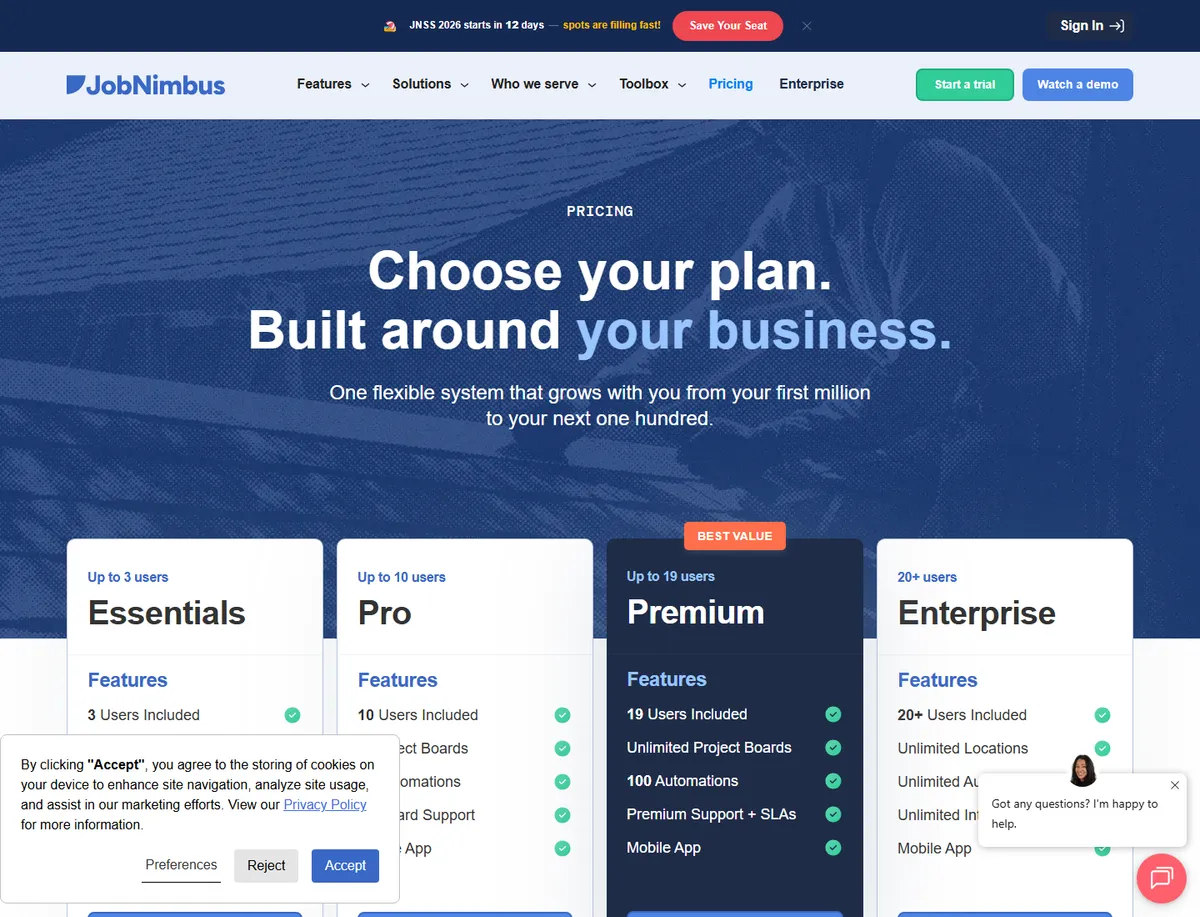 JobNimbus’s pricing page, November 2026. The cookie banner is JobNimbus’s, not ours.
| Plan | Users | Price |
|---|---|---|
| Essentials | Up to 3 | Request pricing |
| Pro | Up to 10 | Request pricing |
| Premium (marked best value) | Up to 19 | Request pricing |
| Enterprise | 20 or more | Contact sales |
Other details from the page:
- Add-ons: a Marketing Bundle and a Communications Bundle (the page says Communications is for current JobNimbus customers), plus Professional Services. All quote only.
- Setup fees: the page says there are no required setup or onboarding fees. Professional Services are optional and paid.
- Per-user fees: none listed. Plans have user limits, and you can add or remove users within the limit.
- Contracts: monthly or annual agreements are available. No prices shown for either.
I am not listing numbers from review sites, because the ones I found did not agree.
What you get, in plain English
JobNimbus is a job and CRM tool built for contractors. The pricing page and its product pages point to a few things: project boards, automations, a mobile app and, on higher plans, more boards and support. It sits on the production side of the business.
 JobNimbus homepage, November 2026.
If you want to compare it with other roofing tools first, read my CRM for roofers guide.
Hidden costs to ask about
Because the plans are quote only, the cost questions matter more.
- What does each user tier cost, and what is the jump to the next one? Ask for all four in writing.
- What is in the Marketing Bundle? Ask exactly what it adds and what it costs.
- What is in the Communications Bundle? Texting and calling add-ons are where bills grow.
- Measurement reports. JobNimbus connects to measurement providers such as EagleView and Hover. JobNimbus’s pricing page does not say what reports cost or who bills for them. Ask what each report costs and whether the provider needs its own subscription. Hover’s help center says importing reports needs a Hover Pro plan, so confirm current terms.
- Professional services. Optional, but find out what onboarding you would realistically need.
- Contract length. Monthly or annual agreements are offered. Ask what the monthly rate costs against the annual one.
Get all six answers in one email, with your user count, so you can compare apples to apples.
A bigger plan only helps if your crew will actually use it.
Pairing JobNimbus with HighLevel
JobNimbus and HighLevel do different jobs. JobNimbus runs the job after the sale. HighLevel runs the lead, the texting, the follow-up and reviews before and after.
There is no native HighLevel integration that I could find. You connect them yourself:
- Make: Make has a JobNimbus app, supported by Make, with triggers for contacts, jobs and activities and actions such as Create a Contact and Create a File. It also has a generic API call action. This is where I would start, since it is visual and cheaper than Zapier per task.
- n8n: I found no JobNimbus node listed on n8n, but JobNimbus publishes an open API (plan-gated, so ask them about your plan), so n8n’s HTTP Request node can call it. n8n is the cheapest at volume and can be self-hosted.
- Zapier: Zapier also lists a JobNimbus app with triggers for contacts and jobs being created, modified or deleted. It is the fallback if you already pay for Zapier.
- Webhooks: HighLevel workflows have an inbound webhook trigger that accepts requests from other tools, and an outbound webhook action that sends data out. Either n8n or Make can sit between the two. So a new job in JobNimbus could trigger a review request in HighLevel, or a HighLevel lead could create a contact in JobNimbus. See GoHighLevel integrations for how the bridge works.
Keep it light. Sync only what you need, such as a contact and a job status, and test the connection on three or four records before you let it run. For the front end, my roofing lead generation post and missed call text back guide cover what HighLevel adds. Costs for HighLevel are in my GoHighLevel pricing breakdown.
Start your free HighLevel trial 30-day trial · cancel anytime · keep the bonuses I may earn a commission if you sign up through my link, at no extra cost to you. DetailsWho should buy JobNimbus
JobNimbus for roofing and contractor teams
Pros
- A visual job board and tasks that suit production-minded offices
- Four plans sized by user count
- No required setup fee, per its pricing page
- Works with measurement providers
Cons
- No public prices, so budgeting takes a sales call
- Texting and marketing sit in add-on bundles
- No native HighLevel integration
- A bigger plan does not fix slow lead follow-up
Buy it if: your office lives in job statuses and documents, you have a few users, and you will use a job board daily. Get the quote in writing first.
Size check from the field: in the exterior companies I see, tools like JobNimbus and AccuLynx earn their cost at roughly $3 to $5 million a year in revenue and up, where there is a real production office to run. If you are under that, Roofr or a lighter field tool plus HighLevel for follow-up is usually the better spend.
Skip it for now if: you lose leads to missed calls and slow replies. A roofing tool will not fix that. Look at the other options in my Roofr pricing and AccuLynx pricing posts, and at HVAC CRM and Jobber alternatives if you work outside roofing.
Two ways to add HighLevel
Path 1: your own HighLevel account. Start a trial and build it yourself.
Start your 30-day extended free trial 30-day trial · cancel anytime · keep the bonuses I may earn a commission if you sign up through my link, at no extra cost to you. DetailsPath 2: prefer it set up for you? My Growth Plan is $97 a month for white-label HighLevel already set up for local service businesses. See the Growth Plan page.
Next steps
- Email JobNimbus for a written quote with your user count and any bundles.
- Ask the six questions in the hidden costs section.
- Decide whether your bigger problem is production or lead follow-up.
- If it is follow-up, test HighLevel next to it.