 Jonathan Blake

Zoho CRM is cheap, flexible and part of a big family of apps. HighLevel is flat-priced and does a lot in one place. If you are weighing GoHighLevel vs Zoho, the real question is whether you want a low-cost CRM you build around or one platform that already has the pieces.
Short answer: pick Zoho CRM if you want a customizable CRM at a low per-user price, or a free start, and you are comfortable adding other apps. Pick GoHighLevel if you want texting, calls, booking, funnels and automation without stitching tools together. Zoho sells you a CRM and a catalog. HighLevel sells you the whole shop.
I run my agency on HighLevel and earn a commission when you sign up through my link. I will tell you where Zoho comes out ahead.
GoHighLevel
- Starts at: $97/month, unlimited users
- Best for: Small businesses and agencies
- Free trial: 14 days, or 30 days through my link
Zoho CRM
- Starts at: Free for 3 users, then $14/user/month
- Best for: Cost-sensitive teams that want to customize
- Free trial: Free plan, plus trials on paid plans
GoHighLevel vs Zoho CRM at a glance
| Item | GoHighLevel | Zoho CRM |
|---|---|---|
| Built for | Small businesses and agencies that want one platform | Teams that want a customizable CRM at a low price |
| Price model | Flat monthly, unlimited users and contacts | Per user per month |
| Entry price | $97/month | Free for 3 users, then $14/user/month billed annually |
| CRM and pipelines | Built in | The core of the product |
| Two-way texting | Built in, pay per message | Not confirmed as a standard CRM feature |
| Funnels and forms | Built in | Check current features |
| Calendar and booking | Built in | Check current features |
| Reusable setups | Snapshots | Not found on its pricing page |
| White label and reselling | Yes | No |
| AI | Conversation AI, Voice AI, AI Employee plans | Built-in AI agents listed on its pricing page |
Pricing compared (real monthly cost)
HighLevel is $97, $297 or $497 a month as of late 2026, with unlimited users and contacts. Usage is billed on top: about $0.00747 per text segment, $1.15 a month for a local number and about $0.0166 a minute for outbound calls. In my example of 1,000 texts, 400 outbound minutes, 300 inbound minutes and one number, usage came to $18.76 a month. See my GoHighLevel pricing breakdown.
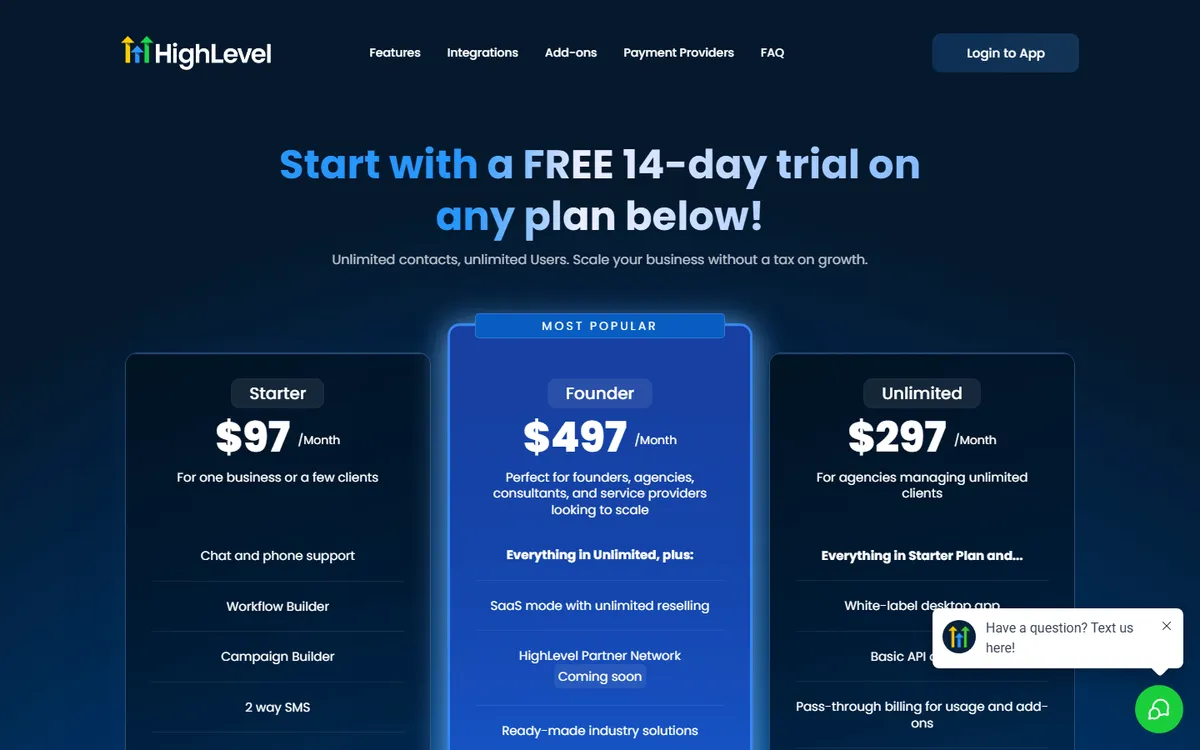 HighLevel’s pricing page, November 2026.
Zoho CRM charges per user. Its pricing page lists a forever-free plan for 3 users, then Standard at $14, Professional at $23 and Enterprise at $40 per user per month on annual billing.
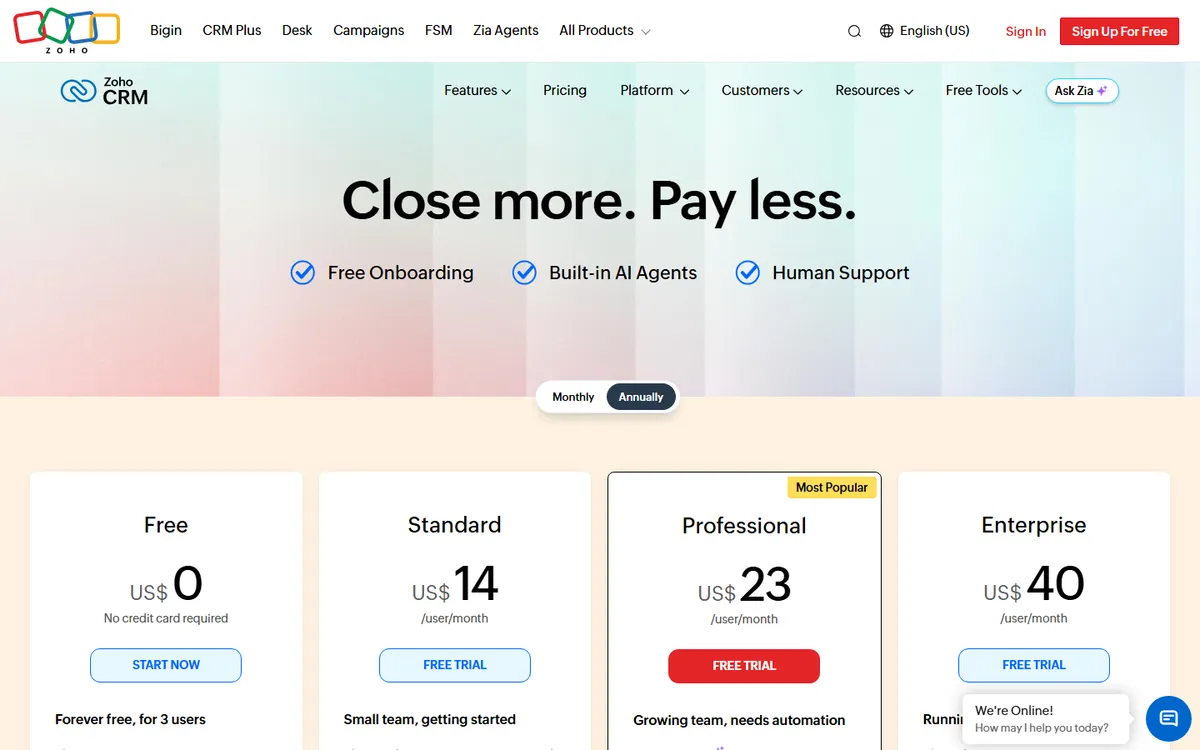 Zoho CRM’s pricing page, November 2026.
A rough software-only comparison, using Zoho’s annual per-user prices:
| Team size | HighLevel | Zoho Professional | Zoho Enterprise |
|---|---|---|---|
| 3 users | $97/month | Free plan covers 3, or $69/month | $120/month |
| 10 users | $97 or $297/month | $230/month | $400/month |
| 25 users | $297/month | $575/month | $1,000/month |
Zoho wins on price for a small team, and the free plan is genuinely useful. The flat plan catches up around ten users on Professional. The bigger question is what the number buys. Zoho’s price covers a CRM. Texting, a funnel builder, a booking page, email and a phone system are either separate Zoho products or other tools, each with its own bill. HighLevel’s price covers those inside one account, with usage billed separately.
Where Zoho wins
Zoho is a serious product, and for some buyers it is the smarter pick.
- Price. For one to ten users, Zoho is cheaper, and a free plan covers up to three.
- Customization. It is known for letting you shape modules and fields to fit how you work, which I rarely need but some teams do.
- The app family. Its navigation lists Bigin, CRM Plus, Desk, Campaigns, FSM and more. If you already use several, they connect.
- Low-risk start. The free plan lets you try it with real contacts without paying.
- Per-user control. If you only want two people to have access, you only pay for two.
If you are a small team that mostly needs contacts, deals and basic reporting, Zoho does the job for very little money.
Where GoHighLevel wins
HighLevel wins when your lead handling needs more than a CRM.
- Texting and calls built in. Missed-call text back, review requests and reactivation texts are native. See missed-call text back.
- One login. CRM, forms, funnels, calendars, email, texting and AI sit in the same account.
- Flat pricing as you grow. Adding users adds no seat fee.
- Snapshots. A working setup copies to a new client or location in minutes.
- White label and reselling. Brand the platform as your own and, on the $497 plan, resell it. See GoHighLevel white label.
The cheapest CRM is the one your team actually opens every morning.
GoHighLevel
Pros
- Flat pricing with unlimited users and contacts
- Texting, calls, booking, funnels and forms built in
- Snapshots, white label and SaaS mode
- One login instead of a stack
Cons
- No free plan
- Steeper learning curve for a basic CRM need
- Usage fees for texts, calls and email
- Less module-level customization than Zoho
Zoho CRM
Pros
- Free plan for up to 3 users
- Low per-user prices
- Flexible customization
- A large family of related apps
Cons
- Per-user pricing grows with the team
- Texting, funnels and booking may need other products
- Can feel busy with many modules
- No white label
CRM depth and customization
Zoho is a real CRM with room to shape it. If your business has unusual data, such as custom modules, special approval steps or detailed reporting, Zoho gives you more room than HighLevel does. HighLevel’s CRM covers what a local business or agency needs: contacts, tags, custom fields, multiple pipelines and an opportunity board. It is less configurable, but it lives in the same account as the phone system, texting, calendars and reviews.
Edge: Zoho for customization. HighLevel for having everything in one place.
Automation and workflows
HighLevel includes its full workflow builder on every plan, with triggers built around missed calls, form fills, appointments, stage changes and reviews. Zoho has automation too, and its tiers add more as you move up, so check which features sit on which plan before you commit. Because HighLevel workflows live in snapshots, I build a follow-up sequence once and every new client gets it.
Edge: HighLevel for agencies reusing setups. Zoho for one company with a technical ops person.
Texting, calling and AI
HighLevel includes two-way texting and calling, billed per message and per minute. I could not confirm built-in two-way texting as a standard CRM feature on Zoho’s pricing page. Zoho’s page does highlight built-in AI agents. HighLevel’s Conversation AI answers texts and chats and books appointments, and Voice AI answers calls. If you want AI that answers leads, price both with your actual call and text volume.
Ease of use and learning curve
Zoho can feel busy because of how many modules and options it has, though the core CRM is approachable. HighLevel has a steeper curve and settings that feel scattered at first. In both cases the real work is building your processes. Pick the one whose menus you can follow without a manual, and test that in the trial.
Support and ecosystem
Zoho’s strength is its family of related apps, and its navigation shows how many there are. If you want a help desk, a campaign tool and a field service tool from one vendor, that is a real advantage. HighLevel’s ecosystem is smaller but agency-focused: snapshot sellers, workflow templates, a busy community on Facebook and YouTube, and an API. HighLevel support quality varies, and the community often answers faster than a ticket does.
Three mistakes I see when people pick a CRM
Choosing on the free plan alone. Free is a good way to learn, but check what you will need in six months and what those features cost on the paid tiers.
Forgetting the cost of stitching. Every connector between tools is something that can break and something you have to maintain. One platform has fewer seams.
Customizing before you have a process. Whether you pick Zoho or HighLevel, start with the three things the system must do and build those first. Extra modules can wait until the basics work.
Which should you pick?
- If you are a team of one to three that mostly tracks deals, start on Zoho’s free plan. It costs nothing to learn whether you need more.
- If you run a local service business that lives on calls and texts, pick HighLevel. The follow-up tools are native.
- If you run an agency serving several clients, pick HighLevel. Flat pricing, snapshots and white label are built for you.
- If you already use several Zoho apps, stay with Zoho unless the stitching is the problem.
- If you are paying for a CRM plus texting plus a funnel tool, compare the total against HighLevel. That is where the flat plan tends to win.
Switching from Zoho CRM to GoHighLevel
If you are moving a team over, here is the order I would use:
- Export contacts, accounts and deals from Zoho as CSV files.
- List the modules you actually use. Most small teams use two or three.
- Create matching custom fields and pipeline stages in HighLevel before importing.
- Rebuild the few workflows that matter, starting with new-lead follow-up and missed-call text back.
- Register your phone number for texting early, because approval takes time.
- Run both for a couple of weeks, then switch the team and cancel Zoho.
For more options, see Zoho CRM alternatives and my software alternatives hub.
My pick and why
For a small business or agency that needs follow-up, texting, booking and funnels, I pick HighLevel. One flat price and one login beat a cheap CRM plus a pile of other subscriptions. If you only need a low-cost CRM, or you are already invested in Zoho’s app family, Zoho is the better value and I would say so.
Read my full GoHighLevel review for the rest of the platform. If you want help moving a business off Zoho, that is a common consulting project.
Try HighLevel side by side
The best test is to rebuild one real process in HighLevel during the trial. Start through my link and you get a 30-day extended free trial instead of the standard 14 days. Build one pipeline, one form, one missed-call text back workflow and one review request, and compare it against your Zoho setup. If you want help finding leads to put in it, look at my coaching.
Start your free HighLevel trial 30-day trial · cancel anytime · keep the bonuses I may earn a commission if you sign up through my link, at no extra cost to you. Details