 Jonathan Blake

Search “best CRM for marketing agencies” and most of what comes up is a generic “best CRM” list with “for agencies” tacked onto the title. The actual lists rank tools built for one sales team, because that’s what most CRM comparisons are written for.
An agency isn’t one sales team. It’s one team running marketing and follow-up for several separate businesses, each with their own contacts, pipelines and conversations that shouldn’t mix. That changes what “best” actually means, and it’s why I run my own agency on a different kind of tool than most solo consultants would pick. If you are still deciding what kind of agency to run, my SMMA vs AI agency comparison helps.
What an agency CRM actually needs, beyond “CRM”
A basic CRM does three things: stores contacts, tracks deals through stages, and logs activity. Every tool on this list does that. What separates an agency-ready CRM from a regular one is three more things on top:
- Sub-accounts (or an equivalent structure). Client A’s contacts, pipelines and conversations need to stay completely separate from Client B’s, inside one login for you.
- Reusable setups. Building the same pipeline, workflow and form from scratch for every new client doesn’t scale. You want to build it once and copy it.
- White label, if you plan to resell. If clients pay you for “your platform,” not “a HighLevel account” or “a HubSpot account,” the software needs to let you put your name on it.
A CRM built for one sales team doesn’t know what to do with client number two. That’s the gap this whole category of “best CRM” lists misses.
Start your free HighLevel trial 30-day trial · cancel anytime · keep the bonuses I may earn a commission if you sign up through my link, at no extra cost to you. DetailsThe options, compared honestly
HighLevel: built around the agency structure above
HighLevel is the one I use. At The Lead Venture we run it for home service clients (tree services, lawn care, roofing), and the three agency-specific needs above are exactly what it’s built around: sub-accounts for each client, snapshots to copy a working setup into a new one, and white label starting on the Unlimited plan. It’s also a real CRM underneath all that: contacts, custom fields, multiple pipelines, and a shared inbox for texts, emails and social messages.
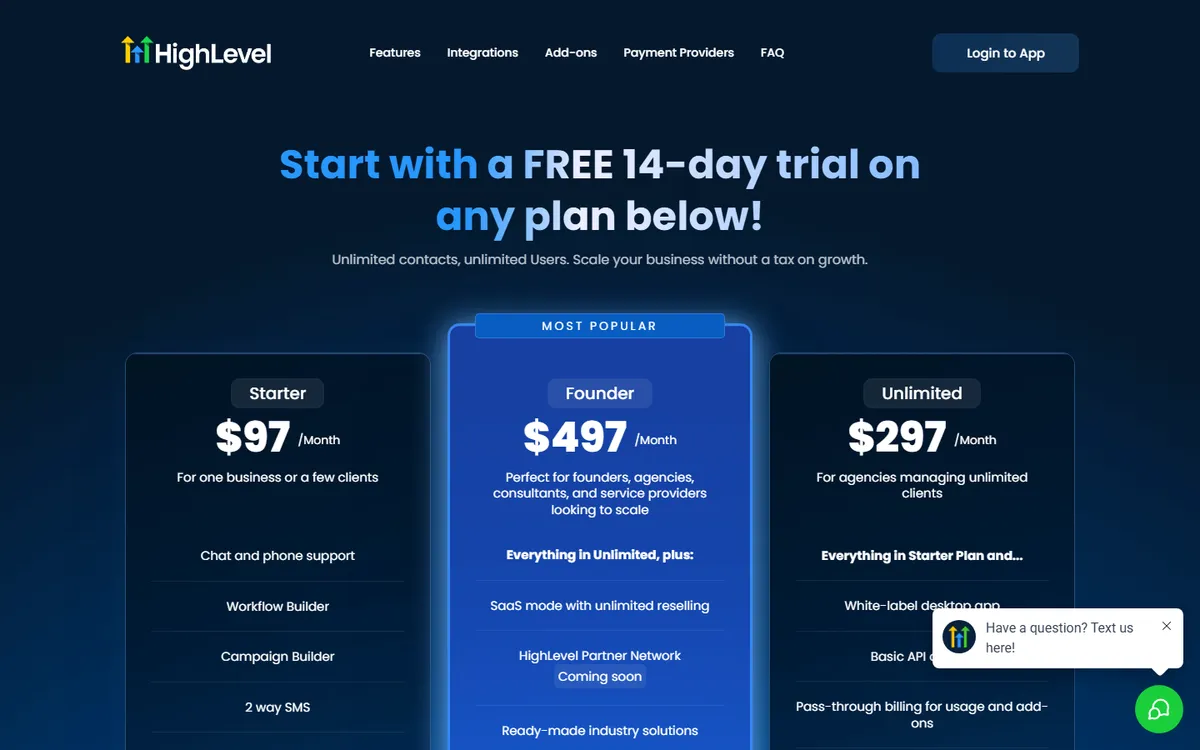 HighLevel’s pricing page, November 2026.
What it isn’t: the most polished CRM on pure data and reporting. GoHighLevel vs HubSpot goes through that trade-off directly, cost included.
Best for: an agency running marketing and follow-up for more than one client business.
HighLevel for an agency
Pros
- Sub-accounts keep each client separate
- Snapshots copy a working setup into a new account
- White label starts on the Unlimited plan
Cons
- Not the most polished CRM on pure data and reporting
HubSpot: the strongest CRM-first alternative
HubSpot’s CRM, reporting and data tools are more polished than HighLevel’s, and it’s easier for a non-technical team to pick up. If what you want most is CRM quality and you’re not trying to resell the platform itself, it’s a strong pick.
What it isn’t: built to be resold under your own brand, and priced per seat rather than flat, which changes the math fast once you’re running more than a few client logins. I cover the real cost at 1, 5 and 20 clients in GoHighLevel vs HubSpot.
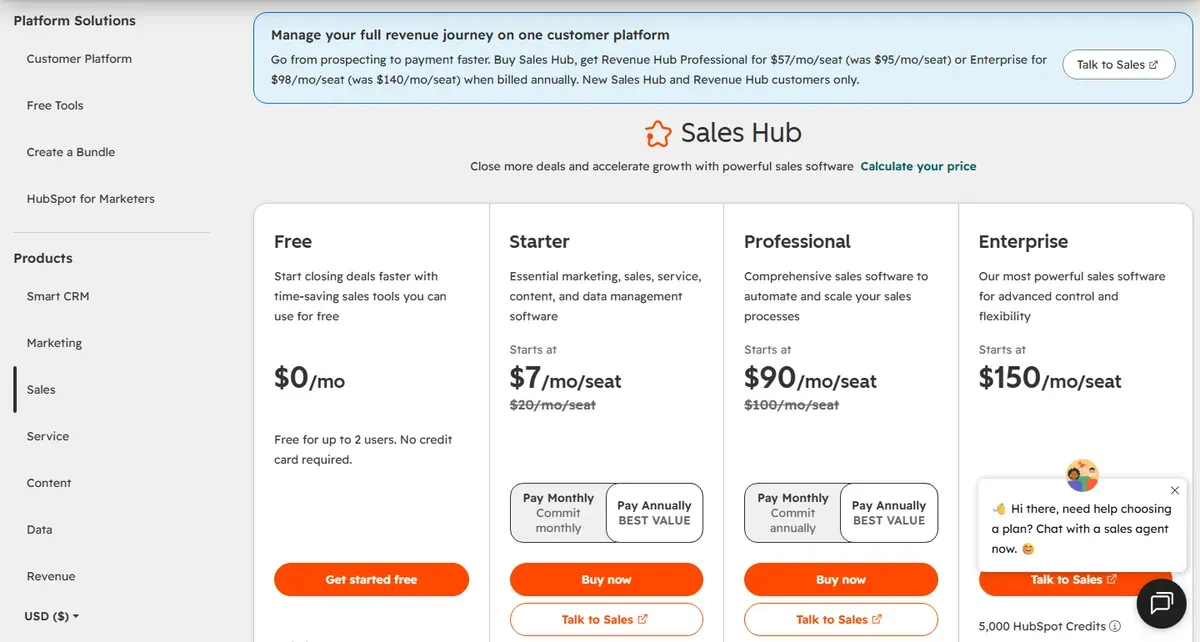 HubSpot’s Sales Hub pricing page, November 2026.
Best for: a consultant or small team that wants CRM polish and isn’t trying to run or resell client sub-accounts.
Pipedrive: a plain, visual pipeline for a small team
Pipedrive does one job well: a clean, visual sales pipeline. There’s no sub-account structure and no white label, so it suits an agency with one unified pipeline for its own business development, not a tool for managing separate client accounts.
Best for: tracking your own agency’s sales pipeline, not your clients’ marketing systems.
Keap: simple CRM and email automation for small operators
Keap targets small businesses that want contacts and email automation without a steep learning curve. It’s not built around agency structure at all.
Best for: a very small agency or solo operator who wants simple automation and nothing else.
| Tool | Best for |
|---|---|
| HighLevel | An agency running marketing and follow-up for more than one client business |
| HubSpot | A consultant or small team that wants CRM polish and isn’t reselling client accounts |
| Pipedrive | Tracking your own agency’s sales pipeline |
| Keap | A very small agency or solo operator who wants simple automation |
GoHighLevel
- Sub-accounts: Yes
- White label: Yes, mid-tier up
- Pricing: Flat, from $97/month
HubSpot
- Sub-accounts: No
- White label: No
- Pricing: Per seat, from $7/seat/month
Pipedrive
- Sub-accounts: No
- White label: No
- Pricing: Per seat
Keap
- Sub-accounts: No
- White label: No
- Pricing: Flat, per account
Price per client, not per month
Here’s the math most comparisons skip. A flat-fee tool with unlimited sub-accounts gets cheaper per client as you add more of them. A seat-priced tool gets more expensive. On HighLevel’s Unlimited plan at $297 a month, four clients works out to about $74 per client, and that number keeps falling as you add accounts. A per-seat CRM charges roughly the same amount per login no matter how many clients that one login is managing.
Price per client, not per month. That’s the number that actually tells you whether a CRM is cheap or expensive for an agency.
Start your free HighLevel trial 30-day trial · cancel anytime · keep the bonuses I may earn a commission if you sign up through my link, at no extra cost to you. DetailsWhy a reusable setup is the real unlock
The CRM itself isn’t where agencies make their margin back. It’s the setup you only have to build once. At The Lead Venture, a new home-service client’s account starts from a snapshot that already has the pipelines, forms, calendars and follow-up workflows we use for that niche. Setup for a new client takes a fraction of the time it took to build the first one.
That reusable setup is also what made one of our bigger wins possible. In March 2026, a workflow built to text and email a client’s old, cold leads (356 of them, sitting untouched in their CRM) brought in $24,569 in new business within the campaign window, and over $60,000 across the full season as those reactivated leads kept converting. These were my results based on my experience. Your results may be different. The point isn’t the number: it’s that the campaign existed because the CRM and workflow builder were the same tool, so turning “old leads sitting idle” into “a text and email sequence running automatically” took an afternoon, not a custom integration project.
My pick, and who should pick differently
I run my agency on HighLevel, and for anyone managing marketing and follow-up for more than one client business, it’s still my answer to “best CRM for marketing agencies.” If you want more detail on the platform itself, my full GoHighLevel review and the pricing breakdown cover the rest. If white label specifically is the deciding factor for you, read what white label actually includes.
If you’re not running client accounts at all, or you want CRM polish over agency structure, HubSpot is the honest alternative, and I’d tell you that even though I don’t get paid for it.
Quick wins
Want clients this month? Start here
Set up your own house first. One clear offer for one niche, a simple site, a booking link and your own HighLevel account running the same automations you'll sell. Prospects trust what they can try.
Start with people who already know you
Past employers, old customers, friends who own businesses. Tell them exactly what you set up for marketing agencies and ask for 20 minutes.
Do daily outreach
Calls, emails and DMs to a tight list in one niche. Volume and follow-up beat clever copy.
Demo, don't describe
Build a quick AI agent or missed-call text-back demo in your own HighLevel account and let them try it on the call.
Post what you build
Short screen recordings of real automations. One a day on the platform your buyers use.
Partner with people who own your buyers
Web designers, bookkeepers and software resellers already have the relationship. Trade introductions.
Answer every lead in under a minute
Practice what you sell. Set up your own speed-to-lead automation first.
Work a local area in person
- Pick one area and walk into ten businesses in a row. Ask for the owner, keep it to two minutes and leave a card.
- Bring a one-page printout that shows the problem you fix (missed calls, slow follow-up, no reviews) with their name on it.
- Go back a week later. Most first visits are about being remembered, not closing.
Ask for introductions, not referrals
"Know anyone who could use this?" gets a polite "I'll think about it." Asking to be introduced to a specific kind of person gets names. Set it up when they sign:
"If this works the way I think it will, would you be against introducing me to one or two other marketing agencies you know? I'll give them a a free CRM fit check for your agency."
Then follow up once they're seeing results. With a client you get along with, a little humor works:
"So are you keeping me a secret on purpose, or do you just not like your friends?"
Only joke like that with clients you know well. With everyone else, keep it simple and thank them either way.
Try it before you commit
The fastest way to know if an agency CRM fits is to build one real client setup in it. Start the 30-day extended free trial through my link, build one pipeline, one form and one follow-up workflow for a real business (yours counts), and decide from there. Already signed up through my link? Claim your free onboarding call. Want help setting it up instead of doing it solo? Book a call.
Start your free HighLevel trial 30-day trial · cancel anytime · keep the bonuses I may earn a commission if you sign up through my link, at no extra cost to you. Details